Understanding the Dominator Tree in the Memory Inspector
Like the Ranking List, the Dominator Tree view offers a list of the dynamic memory objects in your program ranked by size. It also cross references dynamic memory objects and the references to them.
The important difference from the Ranking List: With the Dominator Tree you can easily analyze the hierarchy of references to memory objects. You can see the containment hierarchy of bound memory objects in your program. You can easily see which objects belong to the bound memory of other objects.
The Ranking List shows an undifferentiated list of memory objects by size, without clarifying the relationships between the objects.
Here is what you see in the Dominator Tree view:

-
The Memory Object column shows you the top-level memory objects in the internal session.
Memory Object also shows the hierarchy of local memory objects contained in other objects. For example, you can see that the internal table SYSTEM_TABLE is referenced by an attribute of a class object.
The Dominator Tree shows true containment hierarchies: SYSTEM_TABLE is referenced only by the attribute of the class C2 object, {O:14}. It is not part of any other reference hierarchy. If SYSTEM_TABLE were not a bound memory object of the class object, then SYSTEM_TABLE would not be shown as contained in the class object. Instead, the table would appear as a top-level memory object with a list of references to it.
-
The References column shows you the attributes and variables that refer to the memory objects. As you can see, you can identify exactly which variable in which part of the ABAP program holds each reference.
NoteUnlike the Ranking Lists, you cannot compare memory snapshots with the Dominator Tree:
Use the Dominator Tree to analyze containment relationships between memory objects.
Use the Ranking Lists to look for changes between snapshots.
In addition to letting you find out exactly where a memory object is referenced, you can also see how much storage is bound by each object. In this case, three references to separate copies of an internal table account for around 75 MB of storage.
The Memory Inspector shows the true bound storage of a memory object. The Bound storage includes not only exclusively used strings and internal tables, but also exclusively used class objects and anonymous data objects.

In the snapshots we have been following (see the Overview), the question has been, how did the program use 50 MB more of storage between the first and second memory snapshots?
You can use the Dominator Tree as one tool for finding an answer to this question. In this case, the answer is simple: the large (25 MB) internal table now exists in three different copies. Between the two snapshots, something that the ABAP program did forced the ABAP runtime to complete its lazy-copy operation of the initial, shared copy of the internal table. (For more information, see Memory Inspector Concepts.)
You can see that the table exists twice as separate memory objects in the context of the ZSP_MEMORY_ANALYSIS... program. It also exists as a memory object within the scope of an instance of an ABAP class. Armed with this knowledge, you could now go on to analyze the program to see whether it is handling the internal tables correctly.
Farther to the right in the display, you can see the Object Size (Used) and Object Sized (Allocated) statistics for each memory object. These numbers represent the memory occupied by the memory object itself. This is not necessarily the size of the entire bound storage.
For example, class object {O:14} in the illustration above has a bound memory size of more than 25 million bytes. Its object size, however, is only 408 bytes, the amount of storage required for the class instance itself.
In the case of internal tables and strings, the bound allocated size and the allocated object size are identical.
Interpreting Changes in the Dominator Tree
Let's take a closer look at how to read changes in the Dominator Tree from one snapshot to the next, Even though you have to compare snapshots by hand in the Dominator Tree, the trouble is often worth it.
Here, we want to see how it is possible to conclude that changes to two copies of an internal table caused the 50 MB increase in memory consumption.
In the screen shots above, the variables LT_SYSTEM_TABLE in the main program, the SYSTEM_TABLE attribute in an instance of class C2 {O:14}, and an internal table that is shared in main memory by more than one reference (the Reference icon appears at the end of the entry) each account for 25 MB of bound storage.
Here is what the Dominator Tree looked like in the previous memory snapshot, before the extra 50 MB of memory was consumed. Only one copy of the large table exists in memory, held by the LT_SYSTEM_TABLE reference variable in the main program.
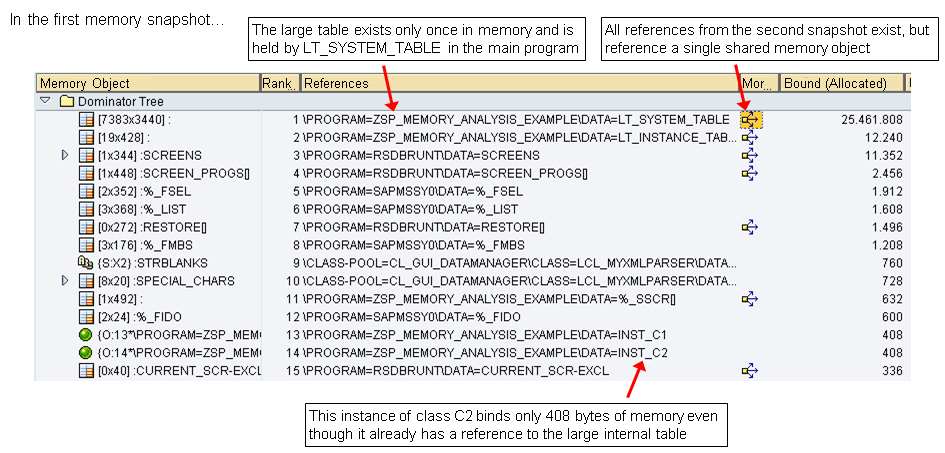
The list of references to LT_SYSTEM_TABLE shows that the SYSTEM_TABLE attribute from the instance of class C2{O:14} - in fact, all of the references from the later memory snapshot - point to the single table object in memory.

In the later memory snapshot, shown below, the instance of class C2 has acquired its own memory object for the large system table. The main program variable LT_SYSTEM_TABLE also now has its own, unshared copy of the table in memory. There is still a shared copy of the large table in main memory (shown as the last line in the screen shot).
Since you know how the ABAP lazy copy of internal tables works, you can conclude that the memory increase is due to changes made to the internal table via the LT_SYSTEM_TABLE variable in the main program and via the SYSTEM_TABLE attribute in the instance of class C2.
The changes forced the ABAP runtime to complete the lazy copy of the table for these two references to the table. As a result, each now accounts for bound storage in main memory, and the memory consumption of the program has risen by about 50 MB.
When to Use the Dominator Tree, When to Use the Ranking Lists
Assume you have seen a large increase in memory use in the Overview when you compared two memory snapshots.
-
Use the Ranking List to find out which memory objects have been added or have grown larger.
-
Use the Ranking List by Type it is not clear where the increase in memory use came (no obvious large new memory objects, as in the example used in this section) or if you suspect that many small program entities may be responsible. You can review memory use by type of entity.
-
Use the Dominator Tree to visualize the containment relationships between the memory objects and to understand in detail which memory object was changed or added in which part of the program.