 Loading Appointments Originating in SAP Dock Appointment Scheduling
You can create loading appointments in SAP Dock Appointment Scheduling and the system automatically created transportation units (TUs) for the deliveries in SAP Extended Warehouse Management (SAP EWM). Linking the loading appointments in SAP Dock Appointment Scheduling with the deliveries in SAP EWM allows you to plan the overall workload of the warehouse more efficiently
You can plan in this way for inbound appointments or outbound appointments, especially if the planning for the transport is done by the carrier and not internally by the warehouse staff. This is useful for processes where little preparation is necessary in the warehouse before the vehicle arrives, such as in the inbound process where you can assign the vehicle to a free door when it arrives and the goods are unloaded.
For more information about outbound deliveries and outbound processes, see Loading Appointments Originating in SAP Extended Warehouse Management.
Prerequisites
You have created a docking location that is integrated with SAP EWM.
You have assigned loading points to the docking location.
You have assigned doors to your loading points.
Process
The figure below illustrates the process for a loading appointment that originates in SAP Dock Appointment Scheduling, and is followed by an explanation:
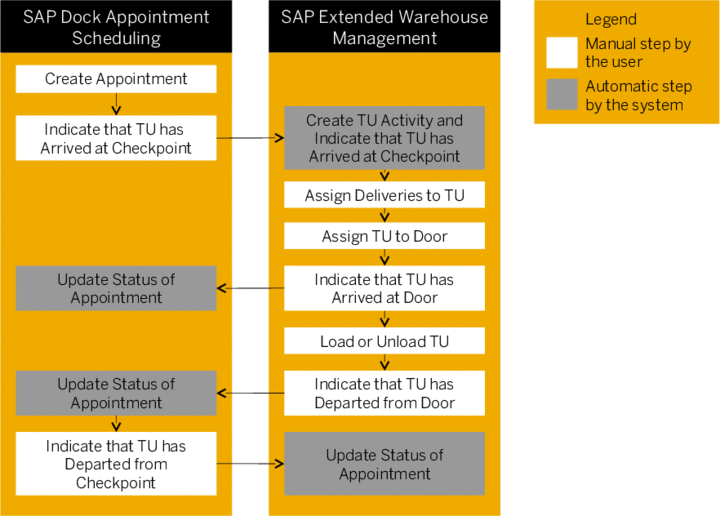
You create a loading appointment in SAP Dock Appointment Scheduling.
The vehicle arrives and you indicate that it has arrived at the checkpoint.
If no planned TU activity exists for this loading appointment in SAP EWM, the system automatically creates a TU activity in SAP EWM. The system indicates that the vehicle has arrived at the checkpoint.
If a planned TU activity already exists for this loading appointment in SAP EWM, the system updates the status of the TU activity to
Arrival at Checkpoint
.
In SAP EWM, you assign the deliveries to the TU and assign the TU to a door.
You indicate that the vehicle has arrived at the door.
The system automatically updates the status of the loading appointment in SAP Dock Appointment Scheduling.
You unload the vehicle.
When the vehicle is ready to depart, you indicate that the vehicle had departed from the door.
The system automatically updates the status of the loading appointment in SAP Dock Appointment Scheduling.
You indicate that the vehicle has departed from the checkpoint in SAP Dock Appointment Scheduling and the system automatically updates the status of the loading appointment in SAP EWM.
Alternatively, you can indicate that the vehicle has departed from the checkpoint in SAP EWM and the system automatically updates the status of the loading appointment in SAP Dock Appointment Scheduling.
Result
You have loaded or unloaded the delivery, and the loading appointment is complete. You can now proceed with the delivery process in SAP EWM as usual.