 Yard Management
Use
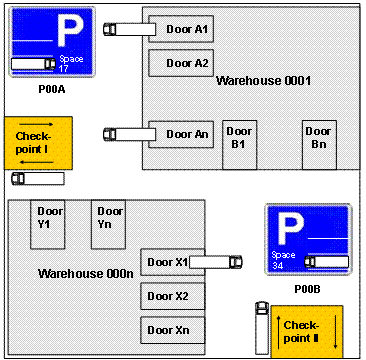
You use Yard Management to manage your yards. The yard is where you maintain vehicles and transportation units that arrive or depart. For more information about yards, vehicles, and transportation units, see Yard, Vehicle, and Transportation Unit.
You map movements within a yard using warehouse tasks. For more information, see Yard Movement.
You can monitor your yard in the warehouse management monitor. For more information, see Warehouse Management Monitor.
The following figure shows an example of a yard:
Integration
Yard management is integrated into SAP Global Trade Services (SAP GTS). For more information about SAP GTS, see the SAP Library under 
SAP xAPPs

SAP Global Trade Services
 .
.
Prerequisites
You have activated yard management for the warehouse in Customizing for
Extended Warehouse Management
under Cross-Process Settings
Shipping and Receiving
Yard Management
Activate Yard Management for Warehouse
.You have made the following settings in Customizing for
Extended Warehouse Management
under Master Data
Shipping and Receiving
Yard Management
:You have defined the yard using the storage type.
You have defined checkpoints. For more information about checkpoints, see Checkpoint.
Optionally, you have structured the yard using storage sections.
You have defined doors in Customizing for
Extended Warehouse Management
under Master Data
Warehouse Door
Define Warehouse Door
. For more information about doors, see Door.You have assigned the doors and checkpoints to yard bins. You have also specified a warehouse process type for the checkpoints. These are required by the system for the arrival at and departure from the checkpoint.
To do this, on the
SAP Easy Access
screen, choose Extended Warehouse Management
Master Data
Shipping and Receiving
Yard Management
Assign Warehouse Door to Yard Bin
or Assign Checkpoint to Yard Bin and SCU
.