Setting Watchpoints
If you want to interrupt a program when the contents of a field or structure change, use a watchpoint. You can set up to five watchpoints, including watchpoints for strings.
A watchpoint can be either local or global. Local watchpoints are only valid in the specified program. Global watchpoints are valid in the specified program, and also in all the other programs it calls.
To set a watchpoint, start the Debugger and proceed as follows:
-
Choose
 Breakpoint
  Create watchpoint
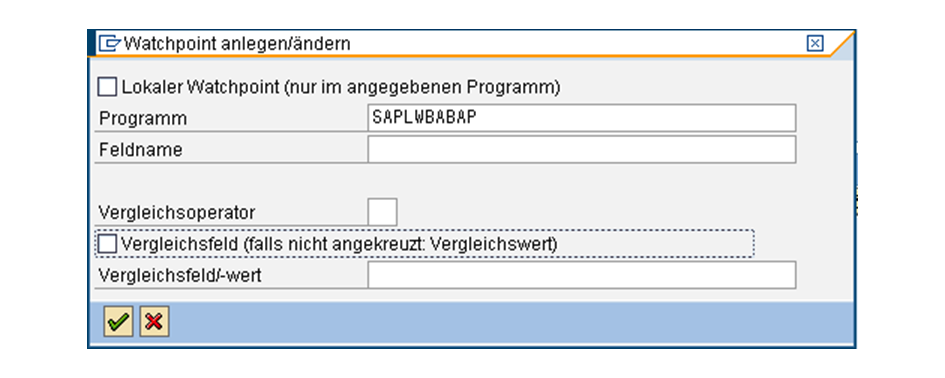
  or the corresponding pushbutton. The Create Watchpoint dialog box appears:
 -
Decide whether you want to set a local or global watchpoint.
-
Enter the program and the name of the field for which you want to set the watchpoint. In the Program field, the name of the program currently running is always defaulted.
-
If you want your watchpoint to be activated each time the contents of the field change, the definition is now complete, and you can return to the Debugger by pressing ENTER.
-
To create a conditional watchpoint, that is only activated when a particular situation arises, choose one of the following relational operators.
Operator
Meaning
<
Less than
<=
Less than or equal
=
Equal to
<>
Not equal to
>=
Greater than or equal
>
Greater than
-
You can use the Comparison field option to specify whether the comparison is to be carried out with a value that you specify or with the contents of another field. Depending on your choice from step 6, enter a value or a field for the comparison.
The system confirms the watchpoint and adds it to the list in the display. When you finish your debugging session, the breakpoint is automatically deleted unless you have explicitly saved