
 Pegging Strategy

Definition
Regulation that determines the time sequence in which the system processes requirements in dynamic pegging, and the time sequence in which the system assigns the receipt elements in the pegging interval to a requirement. The pegging strategy therefore controls:
· Which requirement the system processes first
· Which receipts the system uses first
Use
In dynamic pegging, the system starts with the earliest requirements element. It then processes the next requirements element, and so on. The system has to assign stock to a requirements element first if stock is available and if the availability dates/times of the stock allow this:
· If the requirements date/time of the requirements element is in the past, the system can assign stock to a requirements element whose availability date/time is within or outside the pegging interval.
With the exception of batches, the availability date/time for stock is the current date/time.
· If the requirements date/time of the requirements element is in the future, the system can only assign stock elements within the pegging interval to the requirements element.
To cover the remaining requirements, the system has to assign receipt elements to the requirements element. Since the availability dates/times of several receipts could lie within the pegging interval of a requirements element, you have to define which receipts the system should use first. You have the following options:
· Use the earliest receipt (First in first out)
The system covers a requirement with the earliest receipts in the pegging interval, meaning that it first uses the first receipt in the pegging interval, then the second, and so on. Surplus receipts are only available later with this strategy.
· Use timely receipts
In this strategy, the system covers a requirement with the timeliest receipt in the pegging interval. The system first searches from the requirements date/time toward the beginning of the pegging interval. If the system does not find any receipts in this direction, it then searches from the requirements date/time toward the end of the pegging interval. This strategy supports synchronous requirements production.
You can define the pegging strategy in the location product master on the Demand tab page under Pegging.

If you implement characteristics-dependent planning (CDP), dynamic pegging takes the characteristic requirements and characteristic value assignments of the requirements or receipts into consideration. However, dynamic pegging also processes the requirements and receipts in this case in strict accordance with the sequence defined through the pegging strategy. Dynamic pegging does not attempt to find a more favorable solution for the material flow. Such a solution might exist if you use characteristics with multiple value assignments, intervals, or no value assignments. See the SAP note 526883.
More Conditions
Within the pegging strategy, the system can also consider the following conditions from the location product master:
· Avoid alerts
If you set the Avoid alerts indicator, the system attempts to create pegging relationships without alerts. First, the system attempts to link a requirement with one receipt with a suitable quantity. This means that the receipt quantity must equal the requirements quantity within the context of delivery tolerances. If no receipt with a suitable quantity exists in the pegging interval, the system may assign the requirement several receipts or a partial quantity of a receipt that it also determines based on the pegging strategy. The system tries to avoid date/time alerts here, however. In other words, it only assigns the requirement receipts that lie in the time interval between the alert thresholds for date/time alerts.
· Use complete receipts or stocks
If you set the Use Total Order or Use Total Stock indicators, the system must assign the full quantity of a receipt or stock element to a requirement. The system may not just use partial quantities. If a shortage would arise as a result of the assignment, the system may not assign the receipt or stock element to the requirement.
Example
The graphic below explains the pegging strategies using the example given under Pegging Interval.
Pegging Strategies
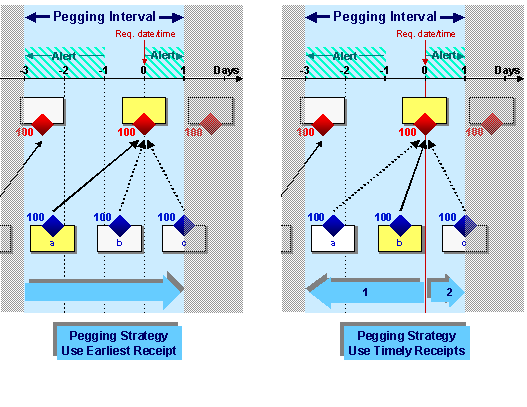
The availability dates/times for receipt elements a, b, and c lie within the pegging interval for the yellow requirements elements. The pegging strategy determines which of these receipt elements the system assigns to the requirements element, as explained below:
· With the use earliest receipt pegging strategy, the system starts the search for receipt elements at the beginning of the pegging interval. It therefore assigns receipt element a to the requirements element. Since the availability date/time of receipt element a is more than one day before the requirements date/time, the system creates an alert. If receipt element a were to only produce 50 pieces instead of 100 pieces, the system would assign another 50 pieces from receipt b to the requirements element.
· With the use timely receipts pegging strategy, the system searches for receipt elements from the requirements date/time to the beginning of the pegging interval. Therefore, it assigns receipt element b to the requirements element. If receipt element b were to only produce 50 pieces instead of 100 pieces, the system would assign another 50 pieces from receipt a to the requirements element. If receipt elements a and b were not available, the system would not find any receipts in this direction. If this were the case, the system would search to the end of the pegging interval and assign receipt element c to the requirements element.