Pegging Interval


Pegging Interval
Definition
Time segment around a requirements date containing the receipt elements that the system can assign to a requirement in
dynamic pegging.The system cannot assign receipt elements with availability dates outside the pegging interval to the requirement. Dynamic pegging relationships are therefore only created within the pegging interval.
Use
Ideally, the availability and requirements dates should be the same. Generally, this is not fully achieved in planning; that is, the availability dates can be earlier or later than the requirements date. In certain circumstances deviations are permissible. If the availability date is too late, this can lead to problems with a lack of material or with adherence to sales order dates. If the availability date is too early, this does not make sense economically or can cause storage problems. You can exclude receipts that are too late or too early via the pegging interval. The pegging interval has the following role in
 displaying alerts:
The system can only generate date alerts for requirements and receipts that are linked by a pegging relationship and are therefore in the pegging interval. In the location product master you can determine from which time deviations between the requirements and availability date the system should create date alerts. The alert thresholds must be in the pegging interval; if the alert thresholds are outside the pegging interval the system never generates alerts, since it never creates dynamic pegging relationships between a requirement and receipts that are outside the pegging interval.

You should carefully reconcile the pegging interval and the alert thresholds for the date alerts to your planning requirements. It can make sense, for example, to define a relatively large pegging interval that also allows a requirement to be linked with late receipts (backward pegging) and to be made aware of the date problems via alert thresholds adjusted to the planning requirements. To avoid meaningless alerts, the alert thresholds should not be too small: if, for example, delays of up to six hours would not create a problem for you that would require planning action, you should not define an alert threshold of one hour.
If the quantities of the receipts within the pegging interval are insufficient to cover a requirement, there is a shortage for the requirement. Receipts that the system cannot link to a requirement via a dynamic pegging relationship generate a surplus. Note: The main cause of a quantity alert are missing pegging relationships between requirements and receipts. Quantity alerts can be due to missing or surplus receipts but can also be due to the pegging interval being too small, which then prevents sufficient existing receipts being linked with the requirements. The receipts total can, for example, agree with the requirements total and quantity alerts can nevertheless occur. Therefore it can make sense to define a pegging interval that is not too small.
When scheduling orders that it recreates in automatic planning, the system can consider the pegging interval and thereby avoid shortage and surplus problems. In the detailed scheduling strategy, you can define whether or not the system should create orders so that the availability dates are within the pegging interval and (as timely as possible) before the requirements date (see

The system
Structure
You define the pegging interval in the location product master. You define this using the maximum allowed deviation of the availability date from the requirements date (maximum allowed earliness of a receipt and maximum allowed delay of a receipt).
Example
You have determined in the location product master that,
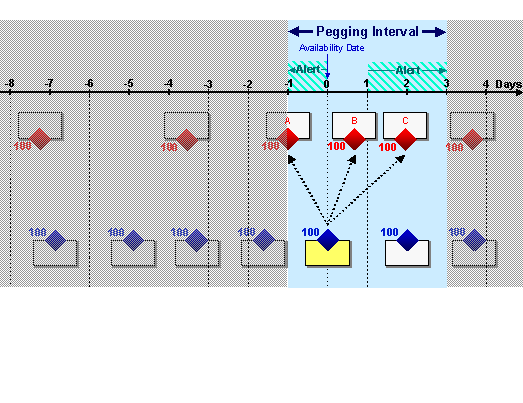
The following graphic gives an example of a planning situation. The pegging interval is shown from the point of view of a requirements element (marked in yellow); that is, in relation to a specific requirements date. The question for this view is: Which receipt element may the system use to cover this requirement? Answer: The system can assign receipt elements a, b or c to the requirements element. The assignment chosen by the system depends on the
pegging strategy specified. If the system assigns receipt elements a or c, the system creates an alert showing that the receipt is too early or too late. Only assignment of b has no alerts.Pegging interval from the point of view of a requirements element

The pegging interval can also be considered from the point of view of the receipt element (marked in yellow), that is, in relation to a specific availability date, as shown in the next graphic. The question for this view is: To which requirements can the system assign the receipt element? Answer: The system can assign the receipt element to requirements A, B or C. If the system assigns the receipt element to requirements A or C, the system creates an alert showing that the receipt is too early or too late. Only assignment to B has no alerts.
Pegging interval from the point of view of a receipt element