
 Campaign Optimization

Use
Within
PP/DS
optimization, you can also perform campaign optimization. The system
optimizes the order sequence at the resources and combines the orders into production
campaigns. At least one bottleneck resource
must exist. At the end of the optimization run, the system can automatically
 create setup
or clean-out orders.
create setup
or clean-out orders.
Campaign optimization aims at weighing up setup and storage costs and achieving a planning result in which the bottleneck resource is occupied to an optimum as far as the following criteria are concerned:
Prerequisites
Requirements must be met in the following areas for campaign optimization:
|
Area |
Prerequisites |
|
·
If several
production process models with different resources exist within an optimization
horizon, the resources defined as bottleneck resources must be the same
for all PPMs. · If you use alternative modes within a PPM and the primary resource of one mode is defined as the bottleneck resource, all primary resources that may be used alternatively must be defined as bottleneck resources. · No pegging relationships must be defined between the operations that are processed at the bottleneck resource. · The bottleneck resource must have been maintained as follows: ¡ It is a single-activity resource. ¡ It is the mode’s primary resource. ¡ A setup matrix has been assigned to it. ¡ The Campaign-Relevant indicator has been set. |
|
|
Campaign profile |
If campaign optimization is to execute the following automatic functions, you must create a campaign profile for every setup group and location: · Setting the campaign color for the setup group specified (the standard color is violet) · Displaying the production planner in the campaign header · Considering a maximum number of orders in a campaign · Creating of setup or clean-out orders To do so, go to Customizing for Production Planning and Detailed Scheduling and choose Production Campaign Planning → Maintain Campaign Profile. |
|
The resource selection for optimization must comprise the following resources: · All alternative bottleneck resources · All resources of the manufacturing level that are no bottlenecks There must be no other bottleneck resources in the resource selection. |
|
|
Settings in the optimization profile or when calling up optimization interactively |
On the Additional Strategies tab, you have: · Set the Backward Scheduling indicator · Set the Bottleneck Optimization and Campaign Definition indicator · Defined the Weights for Target Function of Campaign Optimization · Specified the Processing of Existing Campaigns during campaign optimization On the Extended Settings tab, you have defined the runtime distribution for the following optimization functions: · Initial Solution (required) · Improvement to Initial Solution (required) · Backward Scheduling (optional) · Campaign Optimization (required) |
|
Settings for setup or clean-out order creation |
If you
want the system to automatically create setup or clean-out orders for
campaigns at the end of the optimization run, the requirements described under
|
Features
Processing of Existing Campaigns
On the Additional Strategies tab in the optimization profile, you can determine whether the system dissolves, retains, or may extend existing campaigns during campaign optimization. Depending on the settings, the system proceeds as follows:
·
Dissolve
campaigns
The system
dissolves the campaigns prior to optimization and creates new campaigns during
optimization.
 (A A A) B (A) B
è (A A) (B B) (A A)
(A A A) B (A) B
è (A A) (B B) (A A)
A and B represent orders for products A and B, while the orders in parentheses
represent a campaign.
·
Retain
campaigns
The system can
move existing campaigns backwards or forwards in time but is not allowed to
make any other changes. It:
¡ Cannot remove orders from campaigns
¡ Cannot add new orders to campaigns
¡ Cannot reschedule campaigns to alternative bottleneck resources
(A A A) B (A) B
è (A A A) (A) (B B)
·
Extend
campaigns
The system may
add orders to existing campaigns and move these campaigns backwards or
forwards in time. It:
¡ Cannot remove orders from campaigns
¡ Cannot reschedule campaigns to alternative bottleneck resources
(A A A) B A B
è (A A A A) (B B)
Processing of Campaigns with Released Orders or Orders that Were Started
In Customizing for Production Planning and Detailed Scheduling under Global Parameters and Defaults, you can specify whether or not orders may be removed from campaigns and whether or not a campaign may be dissolved.
This
setting is of importance if, in the optimization profile, you have defined
that existing campaigns may be dissolved during campaign optimization (see
above). The system takes these Customizing settings into account during
campaign optimization.
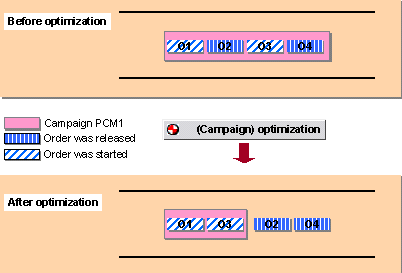
Campaign PCM1 with its four orders O1 to O4 lies within the optimization horizon. Orders O1 and O3 have already been Started whereas orders O2 and O4 have only been Released.
You have made the following settings:
In Customizing under Global Parameters and Defaults
Do Not Remove Orders that Were Started, which means that once a
campaign contains one order that was started, this order must not be removed
from the campaign and the campaign can no longer be dissolved.
In the optimization profile under Processing of Existing
Campaigns
Dissolve Existing Campaigns, which means that existing campaigns may be
dissolved during campaign optimization.
During campaign optimization, the system proceeds as follows:
§ It removes orders O2 and O4 from campaign PCM1 since they have status Released.
§ It retains campaign PCM1 and does not dissolve it since it still contains orders O1 and O3 that have already been started.
For
more information, see
Campaign Statuses
and
Campaign
Integration Between SAP APO and SAP R/3.
Processing of Campaigns that Are Partially Within the Optimization Horizon
If a campaign lies only partially within the optimization horizon, the system only considers those orders for campaign optimization that are within the optimization horizon.

The optimization horizon starts on November 1st 2001. Campaign PCM2 contains four orders O1 to O4. Orders O1 and O2 are before November 1st 2001 and orders O3 and O4 are after November 1st 2001. Orders O3 and O4 have status Released.
You have made the following settings:
In Customizing under Global Parameters and Defaults
Do Not Remove Orders that Were Started, which means that once a
campaign contains one order that was started, this order must not be removed
from the campaign and the campaign can no longer be dissolved.
In the optimization profile under Processing of Existing
Campaigns
Dissolve Existing Campaigns, which means that existing campaigns may be
dissolved during campaign optimization.
In campaign optimization, the system removes orders O3 and O4 from the campaign. Orders O1 and O2 remain in the campaign since they are not taken into account by campaign optimization. It does not dissolve campaign PCM2 since it still contains orders O1 and O2.
Maximum Number of Orders in a Campaign
In the campaign profile, you can specify the maximum number of orders (charges) that a campaign created by campaign optimization may contain.
Campaign Color Determination
In the campaign profile, you can specify the color of the campaign bars for campaigns created by campaign optimization for each setup group.
Displaying the Production Planner in the Campaign Header
In the campaign profile, you can specify a production planner, that is automatically added to the campaign header during automatic campaign creation by the campaign optimizer.
Campaign Description Assignment
During automatic campaign creation by the campaign optimizer, the system automatically assigns a description for every campaign. This is the same as the description of the first output product of any of the orders in the campaign.

You can use the /SAPAPO/PCM01_TXTOPT Business Add-In
(BAdI) to override the standard settings and assign a campaign description
according to your own criteria.
To implement this BAdI, go to Customizing for Production Planning and
Detailed Scheduling (PP/DS) and choose Business
Add-In
→ Assign Campaign
Description After Optimization.
Activities
You
can execute the optimization run interactively in the DS planning board or
during the production planning run.
For more information, see Calling Up the
Optimization in the DS Planning Board and
Production Planning
Run.
If you have specified the runtime distribution for all campaign optimization functions in the optimization profile, the system proceeds as follows during campaign optimization:
...
1. Campaign Optimization
...
a. The system creates an optimum sequence of the orders that are processed at the same bottleneck resource, taking into account setup and storage costs.
b. It adjusts the sequence of the orders at the other resources to the optimized sequence at the bottleneck resource.
c. It combines the orders with the same setup group at the bottleneck resource into campaigns and creates the campaign objects (campaign bars). The campaign profile is selected via the setup group.
2. Initial solution and improvement to the initial solution
In this step, the system considers all planning constraints and the earliest start date that you entered. It reschedules the orders on the basis of the earliest start date, while retaining the sequence between the orders and campaigns created during campaign optimization.
3. Backward scheduling
In the last step, the system takes the requirements dates into account, which means it retains the existing sequence and shifts the orders towards the future.
4. Creating of setup or clean-out orders
If you have specified in the campaign profile that
setup or clean-out orders are to be created, the system creates them
automatically after the optimization run. (See
Setup or Clean-Out
Order Creation)
For more information, see Optimization Run.