
 Testing and Activating the Background Callable
Object
Testing and Activating the Background Callable
Object

Procedure
...
1. Create user John Smith with user ID smith in User Administration console of the portal.
2. Define the following data for this user:
¡ Telephone number
¡ Fax number
3.
Go back to the
callable object design time and choose  (Edit) to switch to
edit mode.
(Edit) to switch to
edit mode.
4. Open the Test tab page.
5. Enter smith for User ID as shown in the example below.
Enter Input
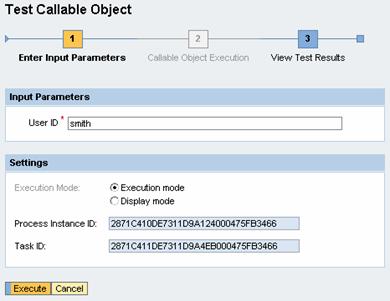
6. Choose Execute.
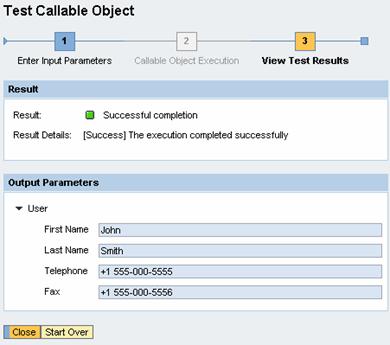
If your implementation was successful, the system executes your callable object and opens the test results view.
In our example the result says Successful completion, and the output parameters are displayed, as shown in the example below.
Test Results
7.
Choose  (Activate).
Result
Your callable object is ready for use in a process.
For more information about process modeling, see Process Modeling.