
 Configuration

Purpose
At configuration time you set up a collaborative process for a specific system landscape. The configuration data is structured, organized, and saved in the Integration Directory in the form of configuration objects.
The Integration Directory is structured around the cross-system task areas.
Task Area and Structure of the Integration Directory
Task |
Relevant Configuration Objects |
Configure Collaboration Profile ● Specification of potential senders and receivers of messages and description of their technical options for exchanging messages. ● In cross-company processes: Specification of the business partners involved (as communication parties) and their services for communication. ● In internal company processes: Specification of the business systems and integration process involved (as services) that communicate with each other by exchanging messages. ● Entering the technical communication paths (adapter configuration in the communication channel object). |
Communication Party (party for short) |
Configure Collaboration Agreements ● Definition of the communication channels to be used by certain senders and receivers to exchange messages. ● Specification of security settings for message security. |
|
Configure Logical Routing ● Specification of routing rules for forwarding messages |
Configuration objects are identified uniquely by an object key. In configuration objects, the object key is dependent on the object type.
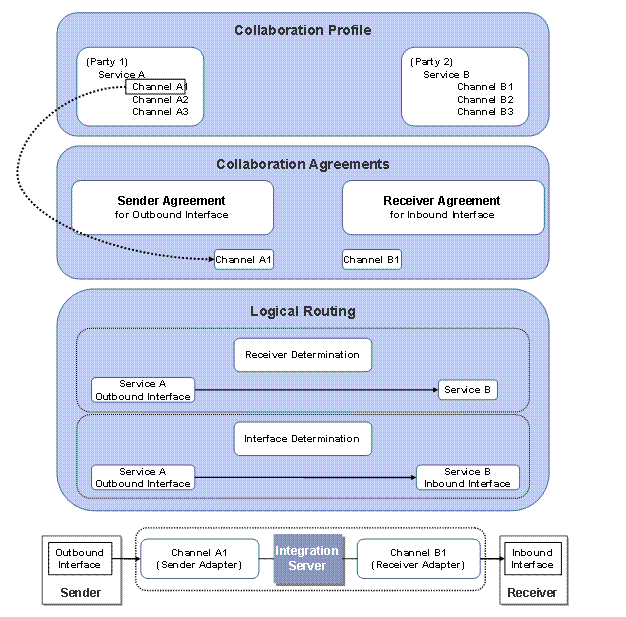
The following figure illustrates how the various different configuration objects relate to each other.
Relationship Between Objects in the Integration Directory
Process Flow
How you proceed with the configuration depends on the underlying application case.
● If you have defined an integration scenario in the Integration Repository for you collaborative process, execute the configuration based on this integration scenario.
More information: Configuring Integration Scenarios
● Use the configuration assistant If you would like to configure a single communication step between two components.
More information: Configuring Message Processing
● You also have the option of performing the configuration manually and defining all the configuration objects separately. This is the most time-consuming alternative, however.
● You also have the option of testing the configuration.
● You can also execute operations in the Integration Directory using a program interface.
More information: Integration Directory Programming Interface

Using the programming interface is recommended for when you want to make mass changes in the Integration Directory which you would not otherwise be able to do using the user interface, or at least only with a very time-consuming manual procedure.
In addition to this, the underlying configuration process flow is different depending on whether you want to configure intra-company process (application-to-application processes) or cross-company processes (business-to-business processes).
More information:
● Configuring Intra-Company Processes
● Configuring Cross-Company Processes
Result
All the information that you create in the Integration Directory at configuration time is available in the caches of the Integration Engine (and the Adapter Engines, if these are involved) for message processing at runtime.