
 Conversion Agent

Purpose
SAP Conversion Agent by Informatica is a data conversion system that enables you to create interfaces between any data formats and XML-based systems. The Conversion Agent can convert unstructured, semi-structured, and structured formats to XML, and the other way around.
The Conversion Agent comprises the Conversion Agent Studio and the Conversion Agent Engine. In the Conversion Agent Studio you can develop and configure data conversions. The Conversion Agent Engine executes the data conversions.
Conversion Agent in Process Integration
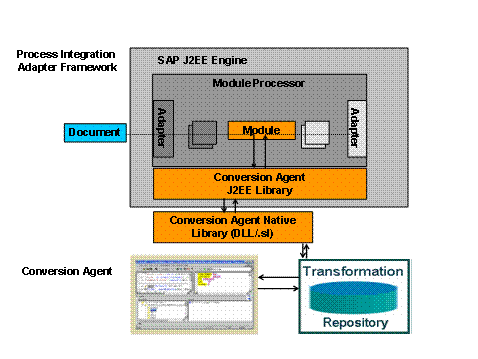
In Process Integration you call the Conversion Agent by using an adapter module. For this purpose, you must integrate this module in the module processor of your adapter. You can only use the Conversion Agent with the SAP adapters of the Adapter Engine.
The module in the sender adapter uses a data conversion statement to call the Conversion Agent Engine and it then receives the converted XML document. In a receiver adapter the source format is XML.

For current information and FAQs for the Conversion Agent, see SAP Note 894815.
Features
If you want to use data transformations in Process Integration, you must perform the following steps after you have installed the Conversion Agent:
For information about installing the Conversion Agent, see Deploying and Using Conversion Agent and Getting Started with Conversion Agent.
...
1. Define your data transformation in the Conversion Agent Studio.
For more information, please see: Getting Started with Conversion Agent.
2. Configure a communication channel within your integration scenario.
More information: Communication channel.
3. In the adapter configuration under Modules, integrate the adapter module CMTransformModule in the adapter type for your communication channel.
○ Under Parameter Name in the Module Configuration, enter the name TransformationName, and under Parameter Value, enter the name of the data transformation you defined.
○ The document to be converted must be in the main payload of the message.
○ If the document to be converted is in an attachment, you can use the PayloadSwapBean module to exchange the payloads.
○ The adapter module can be integrated in all adapters that can be enhanced with additional modules (for example, the SOAP adapter or mail adapter).
For more information about integrating the adapter module, see Deploying and Using Conversion Agent.
For more information about integrating modules in an adapter, see: Module Processor
For more information about enhancing the module processor, see Extending the Module Chain in the Module Processor.
Getting Started with the Conversion Agent
To quickly get up to speed with the SAP NetWeaver Conversion Agent, read the following documentation:
Document Name |
Contents |
Contains detailed information about how you can use the Conversion Agent in SAP NetWeaver. It also includes a description of how to deploy the adapter module for calling the Conversion Agent Engine. |
|
Uses exercises to introduce you to Conversion Agent Studio. Also contains short installation instructions. |
Conversion Agent Guides
The following guides are available:
Document Name |
Contents |
Contains information on the following topics: ● Installing the Conversion Agent Studio ● Updating Conversion Agent projects ● Configuration Editor This editor enables you to configure the parameters of an existing Conversion Agent installation. |
|
Contains a description of all functions of the Conversion Agent Studio. |
|
Contains information about how you enable transformations defined in the Conversion Agent Studio to be executed by the Conversion Agent Engine. |
More Information
Document Name |
Contents |
Contains information about: ● High availability ● Data Backup ● Performance Monitoring ● Scaling In this document, the Conversion Agent Studio is referred to as the ContentMaster Studio and the Conversion Agent Engine is referred to as the ContentMaster Engine. |
|
Contains information about the libraries shipped by the industry standards AL3 (insurance sector), EDI (Electronic Data Interchange), HIPAA (United States Health Insurance Portability and Accountability Act), HL7 (Health Level 7), and SWIFT (Society for Worldwide Interbank Financial Telecommunication). The Conversion Agent libraries are referred to as ContentMaster libraries in the documentation. |
|
Contains information about using the Conversion Agent in the Eclipse environment. |
|
Contains information about using the Conversion Agent Engine on UNIX. |
|
Contains information about how you can execute a Conversion Agent service by using a Conversion Agent COM API. |
|
Contains information about converting COBOL data to XML and the other way around. |
|
|
The documentation for the Conversion Agent is on SAP Service Marketplace at sap.service.com/xi Media Library ® Documentation.