
 Extending the Module Chain in the Module
Processor
Extending the Module Chain in the Module
Processor

Use
If you want to add your own modules to adapters, you must integrate these modules at the correct place in the module processor.
Integration
For more information about creating modules, see Adapter and Module Development.
Prerequisites
In all adapters, the configuration of the module processor depends on the selected message protocol. In adapters with more than one message protocol, you must therefore select the message protocol that you want to use on the Parameters tab page before configuring the module processor. If you change the message protocol at a later point in time, this resets all the changes in the module processor.
Features
The following figures relate to adapters that provide an adapter module.
For more information about handling adapters with multiple modules, see:
· SAP Business Connector Adapter Modules

The figure shows where you must insert your own modules (module 1, 2) in the module processor in asynchronous communication. You always insert the modules before the adapter module.
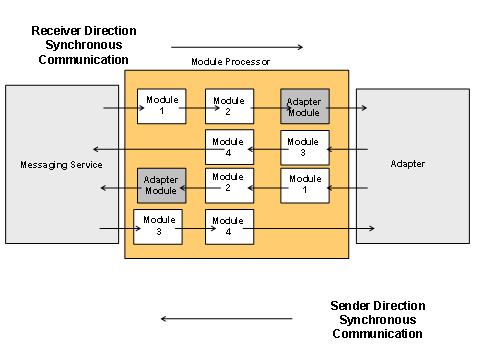
In synchronous communication, it is possible to modify the response messages using your own modules. You always insert modules for editing response messages (module 3, 4) after the adapter module.