
 UI Elements of the
View
UI Elements of the
View 
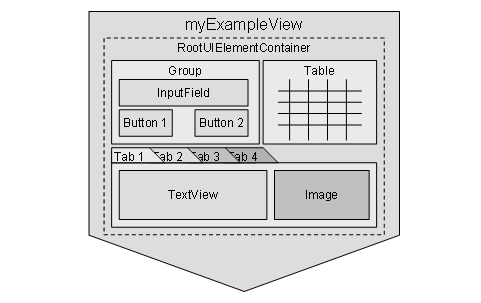
The provided UI elements are used to structure information and functions within the view. This means that they are crucial for the design of the screen layout. Therefore, multiple elements are available with a wide range of purposes:
Some elements are used for the graphical arrangement of UI elements like Group or Tabstrip. You can embed other elements into these elements. Elements like Table or TextView display data, the element InputField can be filled with values entered by the user. Interactive elements like Button or CheckBox are also provided. The following graphic shows a possible arrangement of UI elements in a view:
UI Element Properties
Each UI element has different properties. There are evident properties like background color or element width and several other properties used to specify a UI element. The properties are displayed in the View Designer in the properties table. This table is displayed for each UI element when the element is selected in the tree structure.
 In this chapter, the UI element
properties will not be described in detail but only used in examples. Refer to
the reference section of this programming manual to get a complete list of all available
UI elements including a description of their properties.
In this chapter, the UI element
properties will not be described in detail but only used in examples. Refer to
the reference section of this programming manual to get a complete list of all available
UI elements including a description of their properties.
All static properties can only be entered into the table directly - for example, the ID of a table column.
Most of the properties, however, can be specified statically and also be bound to an element of the corresponding context. Example:

The enabled property of a button is usually specified by binding it to a context attribute. The attribute value specifies whether the button is active or inactive. For this kind of attributes, the Web Dynpro runtime offers a set of special data types.
For more information, refer to Data Binding of UI Element Properties in the section Advanced Concepts in this documentation.
For some
properties, the binding to a context element is required. For example, the
data source of a table can only be specified when it is bound to a context
element. For more information on the structure of a view context and the
binding of UI elements to elements of the view context, refer to the following
sections: Structure of the View
Context, Data Binding of UI
Elements in this programming manual, and the section  Context in the Architecture
Manual for Web Dynpro.
Context in the Architecture
Manual for Web Dynpro.
Actions
In addition to the properties, possible events of UI elements - known as actions - are also managed in the table. Actions are provided for each UI element that expects an activity of the user - for example, a button or an input field. The corresponding event handler is created when you enter a name for the action in the properties table. When you double-click the action name, an ABAP Editor is called in which you can create the code for the event handler method.
 The newly created event handler
method is automatically inserted into the Methods tab. If other event handler methods
for other buttons have been created in the current view, these methods are
already entered in the Methods tab.
They are offered for selection when you enter the name for the new
action.
The newly created event handler
method is automatically inserted into the Methods tab. If other event handler methods
for other buttons have been created in the current view, these methods are
already entered in the Methods tab.
They are offered for selection when you enter the name for the new
action.
For more information on actions of UI elements, refer to:
· Chapter Actions of UI Elements in this programming manual
·
Chapter Action in the
Architecture
Manual for Web Dynpro.