 Follow-Up Activities for the Logistical Process
Follow-up activities define what happens to a service part after the customer (dealer) has returned it:
Scrapping
Return to customer (dealer)
Stock transfer
Forward to remanufacturer
Putaway
Prerequisites
In SAP Customer Relationship Management (SAP CRM), there is a returns authorization item for a transaction of the type return, used part return, or complaint with reference to billing document.
The system replicated the returns authorization item to SAP ERP in a delivery. The system replicated the delivery to SAP Supply Chain Management Extended Warehouse Management (SAP SCM, EWM) into a warehouse request either directly or following confirmation by the customer (dealer). After the goods receipt for this warehouse request, an SAP EWM employee created an inspection outcome, which the system replicated to SAP CRM as an inspection confirmation.
For more information about confirmation by the customer, see Returns Authorization with Activated System Configuration for SPM in the "Returns Authorization" section, point 5.
CRM Customizing
You can only use these functions if you have activated the system configuration for service parts management. For more information and prerequisites, see Functions for Service Parts Management (SPM).
You have made the necessary settings according to Customizing for Follow-Up Activities.
CRM Product Master Data
Depending on the sales area data, in the product master data under Control Parameters: Complaints and Returns
, you have selected the Returns Process
indicator according to your needs.
Possible values include:
<blank> - Undefined
A - Returns with immediate storage
B - Returns with immediate scrapping
C - Returns with inspection
E - Scrap at customer site
F - Returns with external decision (Note: This means that follow-up activities are defined in goods receipt and are processed using SAP SCM).
CRM Account Master Data
For the customer (
Sold-To Party
role), in the sales-area-dependent account master data underFollow-Up Action for Rejected New Parts
andFollow-Up Action for Rejected Used Parts
, you have defined how the system should proceed if the returned parts are rejected at goods receipt. For this reason, you have selected the appropriate values in fieldsFor Values Under Threshold
andFor Values Over Threshold
. The next steps depend on how far over or under the threshold the value is. Possible values include:Scrapping in storage
Return directly
Contact customer
 Note
NoteThe defined threshold is maintained using the condition function 20SC (scrapping limit).
For more information, see Customizing for
Customer Relationship Management
and choose
Basic Functions

Pricing
Define Settings for Pricing
Create Condition Types
 .
.The threshold is determined in the condition record for the sold-to party with the condition type 20SC.
End of the note.
For the remanufacturer (
Remanufacturer
role), in the sales-area-dependent accounts master data, you have used fieldExternal Remanufacturer
to define whether the remanufacturer is internal or external.
Features
The system uses the Returns Process
indicator to determine and trigger the follow-up activities either in SAP Extended Warehouse Management (SCM EWM) in SAP SCM, or based on the inspection results in SAP CRM. In other words, follow-up transactions are created in SAP CRM, SAP ERP, or SAP EWM.
The following graphic illustrates the communication between the systems:
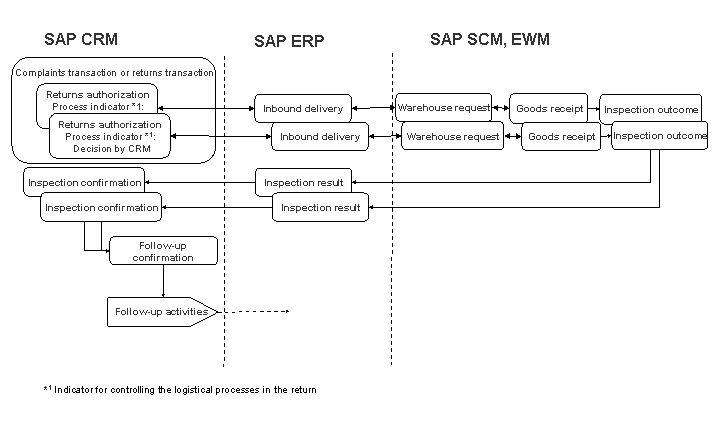
Determination of Follow-Up Activities
In SAP CRM, depending on the Returns Process
indicator, you can define the follow-up activities that are executed in SAP EWM immediately following goods receipt. Determination of the indicator occurs as follows:
The Returns Process
indicator that is defined in the product master is determined for the returns request item and copied into the returns authorization item. You can change the indicator manually in the item overview until the delivery is created in SAP ERP.
The values of this indicator have the following effects:
If the flag value is A, the follow-up activity is putaway. In this case, putaway occurs in SAP EWM immediately after goods receipt.
If the flag value is B, the follow-up activity is scrapping. In this case, scrapping occurs in SAP EWM immediately after goods receipt.
If the flag value is <blank> or F, SAP EWM makes the decision about the follow-up activity.
If the customer (dealer) wants to return an unknown part, you enter (or the customer enters in the Extended Complaints and Returns in E-Service application) a dummy product as a product in the returns request item. The
Unknown Part
indicator must be set in the product master for this part. In this case, the process runs in the same way as with indicator C: In SAP EWM, the inspector enters the actual product and the decision about the follow-up activity.If the value of this indicator is C, SAP CRM requires that SAP EWM creates an inspection outcome. The inspector enters the usage decision in the inspection outcome. The field for entering the follow-up activity in the inspection outcome is not available for entry. Then, the inspection outcome is replicated via SAP ERP into SAP CRM as an inspection confirmation. SAP CRM determines the follow-up activity code for the inspection confirmation item based on the usage decision. The system uses the Post Processing Framework (PPF) to determine the follow-up activity code. The PPF starts an action with action method INSP_FA_DETERM.
Usage decision: Not approved
In the sales area-dependent customer data, the fields
For Values Under Threshold
andFor Values Over Threshold
store information about how the customer (dealer) wants to proceed, depending on the threshold that was defined.Depending on the values chosen for the
Calculat. Type
indicator (in theControl Data 1
section) for condition type 20SC in Customizing for condition types, the system compares the values of the rejected parts with the threshold value as follows:B -
Fixed Amount
: The total value of all rejected parts in an inspection confirmation is compared with the threshold value of the returns authorization item.C -
Quantity
: The value for each item in an inspection confirmation is compared with the threshold value of the inspection confirmation item.The Post Processing Framework uses these parameters to determine one of the following follow-up activity codes:
B -
Scrap
C -
Return to Customer
If the system cannot determine a follow-up activity from the parameters, the confirmation cannot be completed and processing must be done manually. In this case, contact your customer (dealer) to agree on how to proceed and then set the follow-up activity code manually.
Usage decision: Approved
The Post Processing Framework determines one of the following follow-up activity codes:
A - Put away, if the parts have arrived at the target location
D - Stock transfer if the parts have not arrived at the target location yet
E - Forward to the remanufacturer if the parts have arrived at the target location, and if there is a remanufacturer entered as a partner
You cannot set
Completed
status for confirmation items for which the system could not determine a follow-up activity code or for which you did not enter a follow-up activity code. The system status can be set toCompleted
and further processing is possible only if the follow-up activity code is entered manually.
Performing Follow-Up Activities
Depending on the follow-up activity code, SAP CRM triggers the follow-up activities, provided that the following prerequisites have been met:
The follow-up activity code was determined.
Customizing for
Define Follow-Up Action Code for Follow-Up Action
is set as follows:The
Ext. Decisn
indicator is not set (exception: follow-up activityReturn to Customer
, in which case this indicator is irrelevant).The
Active
indicator is set.
The status of the inspection confirmation item is
Completed
.
The following follow-up activities are available:
Scrapping
If SAP CRM has determined follow-up activity code B, this follow-up activity is triggered.
The inspection confirmation item is transferred to SAP ERP using an adapter (CRM_BUS20001_R3A –CRM_INSPECT_R3A). Depending on the type of warehouse management, scrapping is performed as follows:
Warehouse management in SAP Extended Warehouse Management (SAP EWM) in SAP SCM
In SAP ERP, an outbound delivery is created that is replicated to SAP EWM.
Warehouse management in SAP ERP
In SAP ERP, a material document containing a goods transfer posting is created.
The link between the inspection confirmation item and the SAP ERP document is saved in the transaction history.
Return to Customer
If SAP CRM or SAP EWM determined follow-up activity code C (indicator Ext. Decisn
is not relevant), this follow-up activity is triggered.
The inspection confirmation items are copied into a CRM sales transaction (transaction type RTTC). In the sales transaction, all inspection confirmation items with reference to the returns transaction are collected and sent back to the customer. As soon as you release the CRM sales transaction, an outbound delivery is created in SAP ERP. To release the sales transaction, use the action method RELEASE_FOLLOW_UP from the Post Processing Framework (PPF), which you schedule for the transaction type for complaints or returns. A warehouse request for the outbound delivery of the returns is created in SAP EWM. The connection between the inspection confirmation item, returns authorization item, and SAP CRM sales transaction item is saved in the transaction history.
Stock Transfer
If SAP CRM has determined follow-up activity code D, this follow-up activity is triggered.
During goods receipt of a return at a location before the target location, SAP CRM determines whether the inbound delivery should be transferred to the next location. This occurs based on the inspection confirmation that was created in the current location. It is a prerequisite that the current location is reflected in the system as a business partner with the Function Category Location
. You can find Customizing for function categories in Customizing for Customer Relationship Management
by choosing Basic Functions
Partner Processing
Define Partner Functions
. Location determination occurs in SAP SCM, in SAP Advanced Planning and Optimization (SAP APO), in which the current location is compared with the target location.
The inspection confirmation item is transferred to SAP ERP using an adapter (CRM_BUS20001_R3A –CRM_INSPECT_R3A). In SAP ERP, a stock transport order with outbound delivery is created. To do this, in SAP EWM, a warehouse request is created for an outbound delivery to the current location and for an inbound delivery to the target location. The link between the inspection confirmation item and the stock transport order in SAP ERP is saved in the transaction history.
Forward to Remanufacturer
If SAP CRM has determined follow-up activity code E, this follow-up activity is triggered.
At goods receipt for a return in the target location, SAP CRM uses the inspection document to determine whether the inbound delivery should be sent to the remanufacturer.
For more information about determination of the appropriate remanufacturer, see Location Determination with Active System Configuration for SPM.
If the remanufacturer was entered in the inspection document, the service part must be sent to the remanufacturer. The remanufacturer is reflected in the system as a business partner with the role Remanufacturer
. There is a distinction between external and internal remanufacturers.
The follow-up activity is triggered as follows:
Send to internal remanufacturer
A plant that is the target location for forwarding is assigned to the remanufacturer.
The inspection confirmation item is transferred to SAP ERP using an adapter (CRM_BUS20001_R3A –CRM_INSPECT_R3A). In SAP ERP, a stock transport order with outbound delivery is created. To do this, in SAP EWM, a warehouse request is created for an outbound delivery to the current location and for an inbound delivery to the target location. The link between the inspection confirmation item and the stock transport order in SAP ERP is saved in the transaction history.
Send to external remanufacturer
The inspection confirmation item is copied to the SAP CRM sales transaction (transaction type RTTR). As soon as you release the CRM sales transaction, an outbound delivery is created in SAP ERP and a warehouse request for outbound delivery to the external remanufacturer is created in SAP EWM. The link between the inspection confirmation item and the SAP CRM sales transaction is saved in the transaction history.
Putaway
If SAP CRM has determined follow-up activity code A, this follow-up activity is triggered.
The inspection confirmation item is transferred to SAP ERP using an adapter (CRM_BUS20001_R3A –CRM_INSPECT_R3A). In SAP ERP, the inspection document is changed and replicated to SAP EWM. In SAP CRM, the external follow-up activity code for the putaway is determined, and then written in the existing SAP ERP inspection document. The change is replicated to SAP EWM, which creates a warehouse request for putaway.
Consolidation of Follow-Up Activities
You can consolidate the execution of follow-up activities based on the complaint transaction or the return transaction. This means that the follow-up activity for an item is not executed directly; instead, the corresponding inspection confirmation item is collected in a follow-up inspection confirmation transaction. The goal is to execute the follow-up activities together, at a specified time, in the follow-up inspection confirmation transaction. To do so, the transaction must have status Completed
. You can set the status either manually or by using an action for the header of the return transaction.
If you want to use an action to set the status, use the COMPLETE_FOLLOW_UP action method, which you can schedule for the action profile of the return transaction type. As a prerequisite, you must enter the processing parameter PROCESS_TYPE with the corresponding transaction type as the initial value for this action definition.