 Payment on Request
This function supports a payment procedure in which the social authority can provide and reserve a social benefit for a citizen. The benefit is paid by a citizen submitting a payment request and this being approved by a processor.
If you want to use payment requests, you must activate the CRM business function Social Services, Payment on Request (CRM_IPS_4S_7
) and the ERP business function Social Services, Payment on Request (ERP_IPS_4S_7
).
The following graphic illustrates the process flow for a payment on request in SAP CRM and SAP ERP. For a description, see Features
.
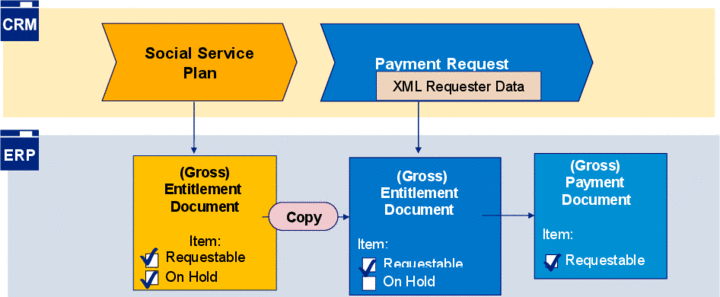
Figure: Payment on Request
Prerequisites
For more information about the Customizing settings, see the Social Services Customizing settings under 
Social Services

Payment on Request
Define Payment Requests
 .
.
(See also: the section Prerequisites
in the SAP CRM business function documentation Social Services, Payment on Request)
Features
Business Transactions in SAP CRM
A payment on request is based on two consecutive business transactions. A user enters a social benefit to be provided to a citizen as a requestable entitlement items in a social service plan. If a citizen wants to claim a social benefit, this is represented using the subsequent payment request business transaction.
Both business transactions reference each other and are organized in the same social case.
Web Request-Based Requester Data
The requester data for the citizen is incorporated as a Web-based XML form in the payment request. This means that the payment request form can therefore also be made available for online services (see also: Web Requests).
Social Services Documents in SAP ERP
Requestable entitlement items in a social service plan are saved in SAP ERP as a gross entitlement document with the selected parameters
requestable
andon hold
. The invisible parameterOn Hold
in the CRM UI prevents payment being made for items in a social service plan.When a payment request is created, a corresponding gross entitlement document is generated as a copy of the existing (SSP) gross entitlement document in SAP ERP. The parameter
On Hold
is not selected in the entitlement document for the payment request. Following approval, this produces a payment request to make payment for the benefit items.Automatic Functions
In the SAP CRM Customizing settings for Social Services, you define the corresponding strategies and rules to support automatic payment request processing on the basis of BAdI implementations and BRFplus.
Function
Use
Item proposal strategy (IPS) for social service plan
During creation of requestable entitlement items in the social service plan.
BAdI
CRM_WEBREQ_ORDCHANGE
For the data update in the payment request for changes in the payment request form.
Case type determination strategy
During creation of a payment request, the business partner for the requester is used to assign an associated social case,
Decision flow determination
During creation of a payment request, a SSP determination strategy is used to assign the decision flow with the requestable SSP entitlement items.
Item proposal strategy (IPS) for payment request
During creation of requestable entitlement items in the payment request.
Item assessment strategy
Supports an automatic valuation of payment request items with the status
Released
orRejected
.Approval strategy
Defines the criteria for the approval check for payment requests.