 Net Calculation
You can use this function to calculate the net payment values for a social service plan (SSP) or a social deduction plan (SDP). You use this function for the following tasks:
Bundle gross payments
Determine net values by including deductions (for example for rent payments or any overpayments that have been made for retentions).
 Note
NoteObserve clearing control in Contract Accounts Receivable and Payable. This defines the final payment amounts. The subsequent clearing of over and underpayments is for example performed in Contract Accounts Receivable and Payable.
End of the note.
You can use the net calculation in one of three ways:
Initial net calculation used to calculate net amounts for an SSP or an SDP taking account of due date rules (see Initial Net Calculation).
Mass net calculation used to update net amounts for a large number of existing net calculations, for example due to legal changes (see Mass Processing for Net Calculations).
Net recalculation used to recalculate an individual net calculation document, for example for retroactive tax changes (see Net Recalculation).
Some of the functions or objects described here can only be used if you activate a Business Function. For more information, see the respective documentation.
Integration
You use the net calculation to prepare for the creation of billing documents that is performed in the next step. The system transfers gross payment document items to the net calculation. The net calculation bundles and sorts the items. The net calculation observes deductions from the social deduction plan (decision-based deductions) and defined rules (rule-based deductions) and then generates a net calculation document for billing. The graphic below shows the document flow for the net calculation in the context of the process chain.
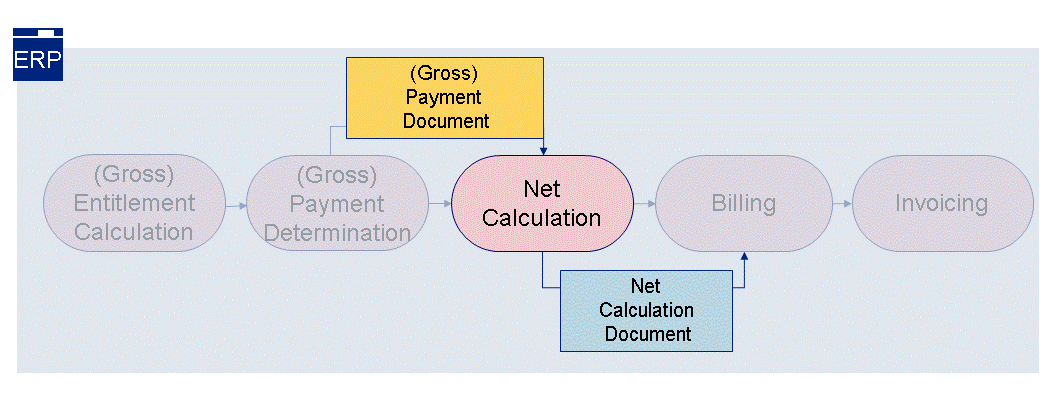
Figure: Document Flow for Net Calculation
For more information about the structure of the net calculation document (NCD), see Net Calculation Document.
Prerequisites
You have defined the payment families in the ERP Customizing settings for
Public Sector Management
under
Social Services

Basic Settings
Maintain Payment Family
 . You have for example defined a payment family with the following due date rule types (DDR type) for restricting the time period and executing the net calculation:
 DDR Type Limitation
DDR Net Calc Exec.
To bundle gross payments, in the ERP Customizing under
Public Sector Management
Social Services
Gross Payment Determination
Define SXP Settings for Gross Payment Determination
SXP Types
, you have assigned thePayment Families
andDue Date Rule Types
.You have made the following settings in ERP Customizing for
Public Sector Management
under Social Services
Net Calculation
.To enable the initial net calculation to start automatically in the background, you must set up the background RFC connection. You have made the settings documented under
Define Background Inbound RFC Destination
.To define the size of the individual processing packages for the mass run and the number of processing units after which the system is to write the net calculation results to the database, you have made settings under
Define Control Parameters for Net Calculation
.To define rule-based (for example taxes, social deductions) and decision-based deductions (for example rents, retentions), you have made settings under
Maintain Deduction Types
.To use rule-based deduction types, you have implemented the Business Add-In
BAdI: Rule-Based Deduction Determination
. NoteSample coding is available for rule-based deduction determination.
End of the note.To define the order in which the system is to process items with the same deduction type, you have made settings under
Maintain Ranking of Deduction Types
.
You have assigned messages to problem classes and in doing so defined which messages are displayed in which class in the application log. You have done this in the ERP Customizing settings under
Financial Accounting (New)
Contract Accounts Receivable and Payable
Technical Settings
Specifications for the Problem Classes of Messages
Assign Messages to Problem Classes
. NoteYou can also use these settings to control the number of messages in the application log.
Messages that are classified in the system as
very important
cannot be assigned to a different problem class.End of the note.A net recalculation requires net calculation documents to be available in the system.
Features
As a caseworker, when you release or approve the social deduction plan and social service plan on the SAP CRM user interface, you start the net calculation and in doing so create net calculation documents. The net calculation document combines all gross payment items and observes the rules and decision-based deductions.
Bundle gross payment items
The net calculation processes gross payment items with the following entitlements:
Regular payments
Extraordinary payments
Underpayments
Overpayments
The bundling criteria for the net calculation, which must all be consistent, determine whether the system bundles the gross payment items.
Payment recipient
Payment family
Payment frequency
Due date rule
Due date
To ensure that the system can bundle items, the payment period must also be consistent.
If you are using the same due date rule for several entitlements and the due date for the payment period is identical, the net calculation bundles the gross payment items. During bundling, the net calculation document header shows you which amounts the system has used to clear entitlements. This information is available in the BAdI: Rule-Based Deduction Determination
for evaluation.
In the case of over and underpayments, you can define your own due date rules that the gross payment determination uses to define the due date for an extraordinary payment. The due date can for example be the current date. This is transferred to the net calculation. If the due date for the extraordinary payment was determined using the same due date rule as the due date rule for a periodic payment, the system compares both due dates. If these are identical, the system combines the net calculations to create a net calculation document.
Determine Net Values Taking Account of Deductions
Rule-based deductions and due date rules
The system includes rule-based deductions in the net calculation. The Business Add-In
BAdI: Rule-Based Deduction Determination
(PSSCB_NET_RULE_BASED_DEDUCTION
) transfers the rule-based deductions to the net calculation. The net amount can be negative.You can configure due date rules so thet the net calculation is only performed by the initial net calculation. You can define these rules for up to ten years in advance.
You can configure due date rules so thet the net calculation is only performed during a mass run. The initial net calculation then only defines the due date for the next net calcuation for the mass run in the gross payment document, but does not create any net calculation documents.
Deductions from the social deduction plan
The system saves decision-based deductions from the social deduction plan as net calculation items with a negative leading sign. The net calculation only observes these deductions if a suitably large gross amount is available. If the gross amount is not sufficient, the net calculation does not observe the deduction at all or only partially observes it. In the case of deductions that cannot be observed at all or can only partially be observed, the system writes a message to the application log for the initial net calculation or the mass run for the net calculation. Alternatively, it records them in the message result for the net recalculation.
The system displays the documents directly in the social deduction plan and social service plan using the
Planned Payments
function. The navigation underPlanned Payments
also offers you various overviews that contain both the results of the net calculation from the ERP System and information about the payment status (see also Overviews of Planned Payments).