 Benefit Calculation and Payment
The automated backend process functions for the Social Services
component described in this section run in SAP Enterprise Resource Planning (SAP ERP).
The automated backend process covers the following mutually dependent functions or process steps:
Data replication between SAP CRM and SAP ERP
Calculation of benefit entitlement amounts
Preparation of periodic payment amounts
Clearing of social deduction amounts
Bundling of payment and deduction items in net calculation documents
Preparation of billing documents as the basis for the payment run that is executed in Contract Accounts Receivable and Payable (FI-CA).
As an enhancement to the process steps in the ERP System, you can display amounts and status data from the net calculation and invoicing in the overviews in the CRM WebClient UI.
Some of the functions or objects described here can only be used if you activate a Business Function. For more information, see the respective documentation.
Process
Overview of Process Steps
The following diagram displays an overview of the dependent billing and payment functions in SAP ERP and the data exchange with SAP CRM.
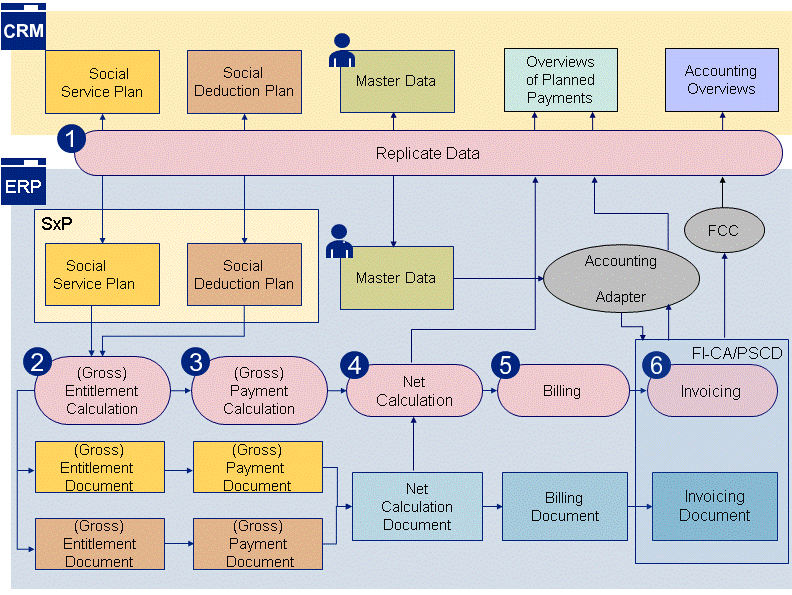
Figure: Benefit and Deduction Calculation in Social Services
Data Replication
Replication of Social Services data between the SAP CRM System and the SAP ERP System allows you to display the benefit and net amounts and the resulting overview of periodic payment and deduction amounts in a social service plan. Bidirectional data replication betweeen the two systems is supported as follows:
Header and item data for social service plans (SSP) and social deduction plans (SDP), the transaction history, status information and business partner and contract account data is replicated from SAP CRM to SAP ERP. The system combines SSP and SDP data as SXP data.
The amounts from the entitlement and gross payment calculation and net calculation are transferred from SAP ERP to SAP CRM where they can be displayed in the SAP WebClient UI.
Gross Entitlement Calculation
During the entitlement calculation, the system calculates the entitlement amounts for the entitlement items in a social service plan and creates a corresponding gross entitlement amount document for subsequent processing.
It also creates the deduction amounts in an associated gross entitlement document for each social deduction plan. You can use a mass process to recalculate gross entitlements, such as those for legal changes that are to apply retroactively. For more information, see Gross Entitlement Calculation.
Gross Payment Determination
During this calculation, the system determines the gross payment amounts from the entitlement amounts that are to be paid regularly on a due date and creates a corresponding gross payment document for subsequent processing.
If a payment notice is changed, the new payment determined takes account of any existing gross payment documents and calculates any over or underpayments or adjusts future payment amounts. You can use a mass process to subsequently recalculate gross payments. For more information, see Gross Payment Determination.
Net Calculation
The net calculation bundles gross payment items according to logical payment criteria (payment recipient, payment family, payment frequency, payment period, due date rule, due date) in a corresponding net calculation document. The net calculation document contains the entitlement amounts to be paid out and deduction amounts entered for a beneficiary (see Net Calculation).
You can simulate the amounts determined by the net calculation for the current social service or social deduction plan in the CRM WebClient UI before the net calculation document is generated. Alternatively, you can access data for the actual payments and display this data in the overviews of the planned payments.
Billing
During billing, you generate the corresponding billing documents on the basis of the net calculation documents. Payment items in a billing document are adjusted or extended so they are suitable for the posting data used in Contract Accounts Receivable and Payable (FI-CA) (for example contract account category, main and subtransaction).
Billing documents support the program runs to be executed in Contract Accounts Receivables and Payable for payments or revenue distributions (distribution of deductions) (see Billing).
Invoicing
Deductions are paid and distributed using the standard program runs supported in the component
Contract Accounts Receivables and Payable
(FI-CA), such as the payment run (see Invoicing).
 Note
Note
During mass processing for gross recalculations, the system performs the gross entitlement calculation and gross payment determination in a single process step (see Mass Processing for Gross Recalculations).
Overviews
The individual process steps provide you with an overview of the respective object that has been processed, for example a social service plan or a social deduction plan including the current amounts that have been calculated. Overviews are also available in the CRM System:
In the case of overviews of planned payments, the system reads data from the net calculation documents and also uses the accounting adapter to read status data from the accounting system.
In the case of the accounting overviews, the system reads data from the accounting system.
For more information, see Overviews and Accounting Adapter.