 Live Rates Plan
A collection of live rates planning elements. A live rates plan groups live rates planning elements by sales area and planning period.
You use this business object to organize live rates planning elements for a planning period and sales area. To create live rates planning elements for a live rates plan, you must run the report Live Rates Planning Elements Creation
(RCRM_FM_LRTP_CREATE_ELM
).
The system creates live rates planning elements based on live rates territories, and account and product hierarchy levels.
You also use the live rates plan to access and edit live rates planning elements and run reports such as Live Rates Funds Determination
(RCRM_FM_LRTP_FUND_DETERMINE
).
You have activated the business function Claims and Funds Management (CRM_CF_1
).
Structure
A live rates plan consists of general data such as the planning period, sales organization, and status.
Status Management for Live Rates Plan
The status of the live rates plan determines which actions you can do during the live rates planning process. The following table outlines the statuses you can use in a live rates plan:
Status |
Description |
|---|---|
|
When a live rates plan has this status, you can do the following:
|
|
When a live rates plan has this status, you can do the following:
You cannot delete a live rates plan that has this status. |
|
When a live rates plan has this status, you can do the following:
You cannot edit or delete a live rates plan that has this status. |
|
To save a live rates plan with this status, you must enter a reason. When you close a live rates plan, the system changes the status of the related live rates planning elements to You can archive a live rates plan that has this status. |
|
When a live rates plan has this status, it indicates that the live rates plan and related live rates planning elements are archived. |
The figure below illustrates the statuses for live rates plans and live rates planning elements and is followed by an explanation:
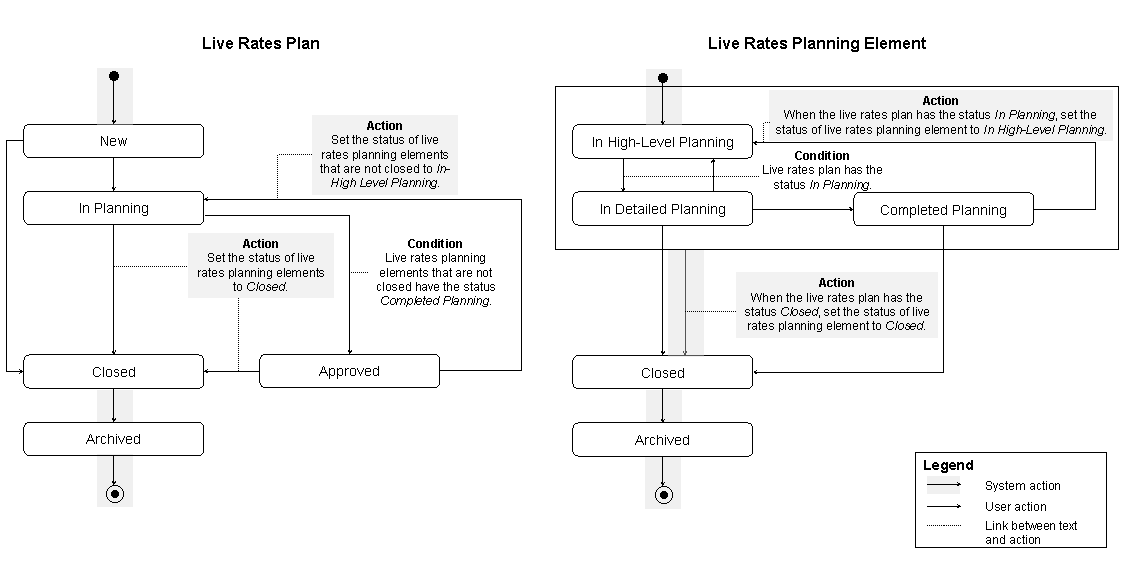
Statuses for Live Rates Plans and Live Rates Planning Elements
The status of a live rates plan has the following flow:
From
New
toIn Planning
orClosed
From
In Planning
toApproved
orClosed
From
Approved
toIn Planning
orClosed
From
Closed
toArchived
You can only change the status of a live rates plan to Approved
if the related live rates planning elements have the status Completed Planning
or Closed
.
The following table explains how changes to the status of a live rates plan may affect the status of the related live rates planning elements:
Status of Live Rates Plan |
Affect on Status of Live Rates Planning Element |
|---|---|
|
The system changes the status of related live rates planning elements to
You cannot change the status of a live rates planning element to End of the note. |
|
The system changes the status of related live rates planning elements to |
|
The system changes the status of related live rates planning elements to |
 Note
Note