 Availability Check in SAP APO, Planning in SAP ERP
 Caution
This function has been superseded by availability check and planning in SAP APO. For more information, see Availability Check and Planning in SAP APO.
Prerequisites
If you carry out planning in SAP ERP, the requirements must be posted in SAP Advanced Planning and Optimization (SAP APO) when the sales order is replicated and saved in SAP ERP.
 Note
Note
In SAP CRM 3.0, the requirements are posted in SAP APO by the sales order when it is saved in SAP CRM. The standard system is set up for this process. We strongly recommend that you use this process, since it is more efficient. You can find more information under Availability Check and Planning in SAP APO.
However, if you still need to carry out planning in SAP ERP, you need to change this setting. You do this in Customizing for
Customer Relationship Management
under
Basic Functions

Availability Check
Availability Check Using SAP APO
Business Add-Ins
Business Add-In for Posting Requirements in SAP APO
 .
.We strongly recommend that you use SAP APO 3.0A or a higher release.
Process
The following illustration (figure 1) shows the data flow between SAP CRM and SAP APO:
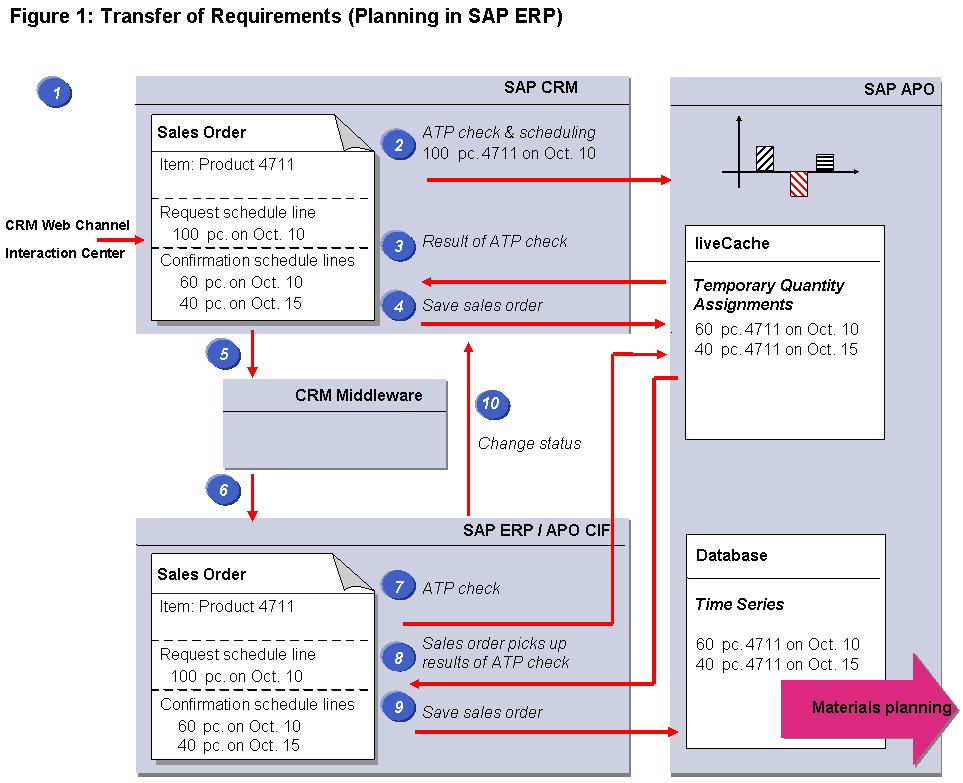
Depending on the business scenario used, a sales order is entered in or transferred to SAP CRM. The product is entered at item level, as are the quantity and desired delivery date.
An availability check is carried out for 100 pieces of product 4711, to be delivered to the customer by October 10.
SAP APO returns the following results to SAP CRM:
60 pc can be delivered by Oct. 10
The remaining 40 pieces cannot be delivered until October 15
It also determines the location (delivering plant). You can find more information under Location Determination in the Sales Order.
In SAP CRM, confirmation schedule lines are generated for the confirmed results.
In the SAP APO liveCache, requirements are created for these results in the form of temporary quantity assignments.
NoteTemporary quantity assignments block the quantities for subsequent sales orders when a product availability check is carried out, but are not relevant for materials planning.
The temporary quantity assignments have the status
Prepersistent
. You can find more information in the documentation for theTOIn
field in the Implementation Guide (IMG) for SAP APO under Global Available-to-Promise (Global ATP Check)
General Settings
Maintain Requirements Profile
.End of the note.The sales order is saved in SAP CRM.
The temporary quantity assignments are then saved in SAP APO and have the status
Persistent
. NoteIf the sales order is not saved in SAP CRM, then the temporary quantity assignments are not saved in SAP APO and will be discarded.
End of the note.The sales order is transferred to CRM Middleware as a business document.
The sales order is then transferred from CRM Middleware to SAP ERP.
The temporary quantity assignments in SAP APO have the status
Postpersistent
(SAP APO 3.0).Since the product 4711 has been specified in the integration model of the APO Core Interface (APO-CIF), SAP ERP picks up the result of the availability check carried out previously for the sales order in SAP CRM.
The result of the availability check is transferred to SAP ERP. As in SAP CRM, the product is entered at item level, and the quantity and requested date are entered in the schedule lines.
The sales order number generated in SAP ERP is transferred to SAP APO.
The sales order is saved automatically in SAP ERP.
The temporary quantity assignments are deleted from the SAP APO liveCache; the requirements are saved in SAP APO as time series. The time series are taken into account for the availability check and are also relevant for materials planning.
SAP CRM sets the
Distribution Status
field in the sales order details toSuccessfully Distributed
. NoteIf the sales order is not successfully transferred, the system creates error messages. The system removes these messages once the sales order has been successfully transferred to SAP ERP at a later stage.
End of the note.
Restrictions
The following processes for the availability check with SAP APO are not supported in SAP CRM:
Batches and other special stocks (for example, consignment stock)
Assembly processing
Third-party order processing
Rescheduling in SAP ERP
Availability check against allocations or planning
Availability check with production triggering
Bills of material
Configurable products
Variant configuration
Once an item has been partially delivered, you cannot carry out an availability check for this item.
More Information
You can find more information about the sales order in the SAP Library for SAP Customer Relationship Management
under Sales Orders.