 Location Determination in the Sales Order
When you enter an item relevant for the availability check in a sales order in SAP CRM, location determination is performed automatically. This occurs either in SAP Advanced Planning and Optimization (SAP APO) or in SAP ECC, depending on which system you use as an ATP system. Once the ATP system has determined the location (delivering plant), it is transferred to the sales order in SAP CRM. The ATP system executes the availability check on the basis of this location.
Prerequisites
The following minimum system requirements apply:
For the availability check using SAP APO: SAP APO 2.0
For the availability check using SAP ECC or SAP R/3: SAP R/3 4.6
Other prerequisites are listed under Location in the Sales Order.
Process
The system determines the location for each confirmed item in the sales order as follows:
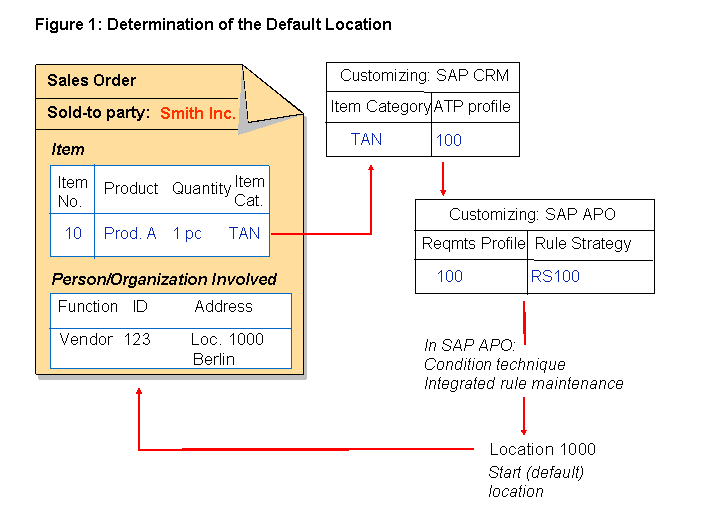
The ATP system determines a default location based on the item category.
The item category has an ATP profile assigned to it.
For the availability check using SAP APO:
The ATP profile in CRM Enterprise is assigned to the requirements profile in SAP APO.
For the availability check using SAP ECC:
The ATP profile is used to specify that the item category is relevant for the availability check.
The requirements profile is used to control the availability check, as well as to determine the default location.
You can find more information in the SAP Library for SAP Supply Chain Management under

SAP Advanced Planning and Optimization (SAP APO)

Global Available-to-Promise (Global ATP)
Advanced Availability Check Methods
Rules-Based Availability Check
 .
.The location is automatically entered in the sales order as
Vendor (Plant)
.
For information on how to set this up, see the Implementation Guide (IMG) under Customer Relationship Management
Basic Functions
Availability Check
.
If you make certain changes to a sales order item, such as in relation to the product, the quantity, or the item category, then the system carries out the availability check again in this location.
 Note
Note
The location is shown in the sales order in the
Vendor (Plant)
field.You can change the location if there are no checked deliveries for the item or one of its subitems.
For more information, see Location - Manual Entry in the Sales Order.
Example
The following figure shows how the location is determined when using SAP APO as the ATP system:
If you use the rules-based availability check, the system can continue to search for the product in other locations to fulfill the requested quantity.
You can find more information about the rules-based availability check in SAP APO in the SAP Library for SAP Supply Chain Management under SAP Advanced Planning and Optimization (SAP APO)
Global Available-to-Promise (Global ATP)
Advanced Availability Check Methods
Rules-Based Availability Check
.
There is further information about the rules-based availability check in SAP CRM under Rules-Based Availability Check.
More Information
There is further information about business partners in SAP CRM under Business Partners.
There is more information about business partners in SAP ECC in the SAP Library for SAP ECC under SAP Business Partner.