
 'Remote Delta Link' Mode

Description
Using this content usage mode, a content administrator on a consumer portal can create delta links to content objects (iViews, pages, worksets, and roles) residing on a remote producer portal. The content administrator on the consumer portal can then reuse, configure, and customize the delta link content as local content. At runtime, the execution of iView applications (source code) is performed on the producer portal.
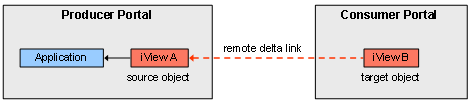
Standard delta link behavior applies to remote delta links:
● Remote delta link objects on the consumer portal can be customized without affecting their source objects on the producer portal.
● Changes to source objects on the producer portal are automatically updated in their corresponding target objects on the consumer portal; except for properties that a content administrator has modified directly in target objects on the consumer portal.
Remote delta link mode is available only to NetWeaver portals.
Advantages and Disadvantages
Advantages |
Disadvantages |
● Supports various object types: iViews, pages, worksets, and roles.* ● The standard behavior of delta links improves flexibility for content administrators—it allows them to modify remote content on the consumer, but at the same time keep unmodified content synchronized with its source content on the producer.* ● Local content can be customized according to local requirements. These changes do not affect the source content on the producer.* ● Runtime execution of iView applications (source code) remains on the producer portal. ● Supports mixed scenarios of local and remote content running together on the consumer.* ● Allows full customization of remote roles on the consumer.* ● Supports end user personalization of remote delta link content on the consumer. ● Allows flexible transport of portal content between portals; the consumer can clone complete Portal Catalog structure (roles, worksets, pages, and iViews).* |
● Once remote delta links are created on the consumer, the source content on the producer portal must not be deleted or moved; otherwise the remote delta link objects on the consumer will not function. ● Remote delta link objects created on the consumer portal need to be maintained and monitored by a local content administrator. |
* These capabilities are not available to roles consumed through remote role assignment. For more information, see 'Remote Role Assignment' Mode.
For examples of use cases that implement this content usage mode, visit the Implementing a Federated Portal Network area on SAP Developer Network at www.sdn.sap.com/irj/sdn/developerareas/ep.
Basic Administration Workflow on the Consumer Portal
...
1. The system administrator defines a connection to the producer portal and registers the consumer with the producer portal.
2. The content administrator connects to the producer portal and browses its Portal Catalog.

Before content can be copied to the consumer, the content and system administrator on the producer portal must first configure certain portal permissions to expose its content. For more information, see Exposing Content on the Producer for 'Remote Delta Link' Usage.
3. The content administrator selects relevant folders, roles, worksets, pages, and iViews residing on the producer portal.
4. The content administrator copies the selected content as remote delta link objects to the Portal Catalog of the consumer portal.
5. The content administrator incorporates the remote delta link content with other local content and assigns it to users.
More information: Consuming Content as Remote Delta Links
Technical Aspects
Pay attention to the following requirements and issues when working with the remote delta link mode:
● After a consumer portal creates remote delta link content, the source objects and its entire delta link chain on the producer are always required. They cannot be deleted.
● If the source objects are deleted or moved to a different folder on the producer portal, the remote delta link objects on the consumer become unresolved delta links and cannot be run.
● If any producer portal pages or layouts are based on non-standard portal components (for example, pages not based on the standard portal component: com.sap.portal.pagebuilder.pageBuilder), their respective portal components do not need to be deployed on the consumer portal.
● If a content administrator copies a folder from a producer portal, and any pair of objects in the folder has a delta link dependency between them, a matching delta link between the two corresponding target objects on the consumer is not generated. Instead, the delta link objects created on the consumer reference the source objects on the producer (see following figure). The reason for this is that a delta link object can only have one source object.

In the figure above, iView A is a unit iView. It is embedded as a delta link (delta link 1 to iView B) in Page 1. Both iView A and Page 1 are located in the same Portal Catalog folder on the producer. The folder is copied to the consumer. As a result of the copy, matching delta link objects are created on the consumer: iView C, iView D, and Page 2. Note that a delta link between iView C and iView D on the consumer does not exist (as do the corresponding source objects on the producer). Instead, remote delta links (2, 3, and 4) between objects on the producer and objects on the consumer are generated. As result of the delta link relationships described in this example, you can expect the following behavior:
○ If a content administrator on the producer modifies View A, then iView B and C are automatically updated as a direct result. iView D is also updated as a result of iView B being updated.
○ If a content administrator on the producer modifies View B, then only iView D on the consumer is updated. iView C on the consumer does not receive this update.
○ If a content administrator on the consumer modifies View C, then none of the remaining iViews are updated.
○ If a content administrator on the consumer modifies View D, then none of the remaining iViews are updated.
○ If a content administrator on the producer adds or removes an iView in Page 1, the changes are updated in Page 2 on the consumer.
● Creating a remote delta link to a role does not include the user assignments of the source role on the producer. A user administrator on the consumer needs to assign new users and groups to the remote delta link role.
● Using the Role Editor and Workset Editor, a content administrator can to add local and remote-based content (from any producer) to a remote delta link role or workset.
● Remote delta link pages are executed at runtime on the producer portal; therefore the extent to which a content administrator can modify a remote delta link page in the Page Editor on a consumer portal is limited:
○ You can only perform the following actions: hide existing content in the page, edit object properties, and switch layouts already assigned to the page.
○ The option to add or delete content and layouts from the page is not available to you.
● A content administrator can mix remote-based content from different producers in a local page or role on a consumer.
● End users on the consumer portal can personalize remote delta link iViews and pages. Examples of personalization includes, such as removing iViews from a pages, changing the page layout, and configuring properties in iViews.
When end users personalize remote delta link pages, note the following:
○ End users cannot add local or remote iViews to the page.
○ End users must use the Restore Defaults option in the page personalization screen to restore iViews they have removed from the page.
● Personalization data as a result of changes to remote-based iViews and pages, made by end users on the consumer, is stored on the producer portal. Storing consumer-based personalization data on the producer, rather than on the consumer, improves runtime performance.
● To optimize runtime performance of remote-based content on the consumer, take note of the following:
○ For all iView types, except for AppIntegrator iViews (such as Web Dynpro ABAP iViews and SAP application iViews (SAP transactions, Business Server Page (BSP) applications, BW reports, Crystal Enterprise reports, Internet Application Components (IACs), and MiniApps)) we recommend you copy the remote delta page that contains the iViews to the consumer, rather than to copy the iViews as individual unit objects and to then embed them in a local page on the consumer.
The reason for this is that a separate round-trip to the producer is made for every remote-based unit object (such as an iView) embedded in a local page on the consumer, even if all the remote-based objects originate from the same producer. For example, if a local page contains five remote delta link iViews, the consumer makes five trips to the producer to render the entire page. If the same five iViews were copied within remote delta link page and run on the consumer, the consumer would make a single round-trip to the producer to render the entire page.
○ For AppIntegrator iViews, we recommend you copy the producer-based iViews individually as delta link iViews to the consumer, and to then embed them in a local page on the consumer. Therefore, where possible do not copy pages that contain AppIntegrator iViews.
● For Web Dynpro Java, the content administrator can create remote delta links to Web Dynpro pages only. The portal does not allow you to create remote delta links to Web Dynpro iViews.
● To enable a seamless flow of data through the federated portal network, the system administrator needs to configure the single sign-on authentication settings. For more information, see Single Sign-On.
● The remote delta link usage mode supports the SSL protocol. For more information, see Setting Up SSL for Remote Delta Link Usage.
● The portal does not permit a content administrator to reuse remote-based content on another consumer portal.
● To support object-based navigation (OBN) with remote delta links, local copies of utilized business objects must exist on the consumer. The remote delta link creation mechanism searches targets implementing business objects and copies them as well, but not as remote delta links. For more information, see Using Object-Based Navigation.
● Note the following when synchronizing updates that exist in source objects on the producer portal to their corresponding delta link target objects on the consumer portal:
○ The producer portal automatically sends content modifications in source objects to their corresponding target delta link objects on the consumer portal once every hour. This interval is configurable (see Working with Remote Delta Link Content).
○ An administrator on the producer portal cannot enforce a content update to its registered consumer portals.
○ A system administrator on the consumer portal can initiate a request for a content update from its producer portals (see Working with Remote Delta Link Content).
● When remote delta link (RDL) iViews and pages are added to a local page on the consumer, the value of any property classed as an integration property (see list below) is retrieved from the consumer at runtime. The values for all other properties (non-integration properties) are retrieved from the producer at runtime. Both cases refer to properties that have not been modified by the content administrator on the consumer. Therefore, if a content administrator on the producer modifies the value of any integration property, the content on the consumer is rendered at runtime using the old value stored on the consumer until the new value from the producer is synchronized to the consumer.
Any remote-based object running inside a remote delta link page uses the integration properties on the producer at runtime, regardless of what is stored on the consumer.
In order for consumer-side remote delta link objects to render at runtime with the new values of the modified integration properties from the producer, the content on the consumer must be synchronized with the content on the producer. Content updates on the consumer can be done either manually by the system administrator or automatically at intervals defined by the system administrator. For more information, see Configuring the Federated Portal Cache and Clearing and Synchronizing the Federated Portal Cache.
The following table lists the known integration properties:
|
General Properties |
|
|
|
● Description |
● Name |
● Object is a Template |
|
Navigation Properties |
|
|
|
● Can be Merged ● Default Entry for Folder ● Entry Point ● Initial State of Navigation Panel ● Invisible in Navigation Areas |
● Launch in New Window ● Merge ID ● Merge Priority ● Sort Priority ● Width of External Window (Pixels) |
● Height of External Window (Pixels) ● Window features ● Workset Map Pictogram |
|
Tray Properties |
|
|
|
● Height Type ● Initial State - Open or Closed ● Maximum Automatic Height (Pixels) ● Minimum Automatic Height (Pixels) ● Show 'Add to Favorites' Option |
● Show 'Details' Option ● Show 'Help' Option ● Show 'Open in New Window' Option ● Show 'Personalize' Option |
● Show 'Refresh' Option ● Show 'Remove' Option ● Show Object Name in Tray ● Show Tray |
● The standard transport mechanism of the portal (export and import services) automatically reconnects remote delta links when moving content from one consumer portal to another (for example, from a test system to a production system). For more information, see Transporting Content.
● When creating a remote delta link to an iView or page that has related items (dynamic navigation or related links iViews), the isolation method of the related item is automatically set to URL (to enforce the isolation mode), regardless of the isolation method set for the corresponding object on the producer portal. For more information, see Isolation Method of iViews.
● In use cases whereby the Application Integration service retrieves properties from objects located in the Portal Content Directory (PCD) of the producer portal, such as SAP transaction iViews that are embedded in remote delta link pages, you may need to manually clear the cached content of consumed content on the consumer before its cache lifetime expectancy has been reached. For example, if a content administrator on the consumer portal changes an application property in a remote delta link iView that a business user has already rendered, then the old property value is taken from the cache at runtime. The new value is rendered in the iView at runtime only when the cache has been cleared manually or when the scheduled cache clearing has taken place. For more information, see Configuring the Federated Portal Cache.
The following figure provides a more detailed view of the runtime flow of content retrieval and rendering starting at the client (business end user) for remote delta link mode (in this example, a remote delta link iView running in a local page):
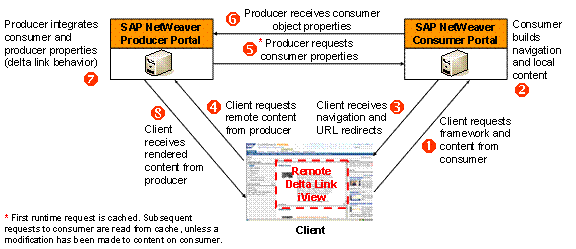
The following figures show the design time and runtime relationships between objects on the producer and the consumer:

Figure: Remote delta linkof a single iView. On the producer portal, iView 1 exists as a local entity and executes an application residing on the same portal. At design time, the content administrator on the consumer creates the remote delta link View (iView A) based on iView 1. The content administrator on the consumer then assigns iView A as a delta link to a local role (Role A). At runtime, when users assigned to Role A log on to the consumer portal, the execution of iView A' in Role A passes through iView A, which executes iView 1 on the producer portal.

Figure: Remote delta linkof a single page. On the producer portal, iView 1 exists as a local entity and executes an application residing on the same portal. Page 1 contains iView 1', which is a delta link of iView 1. At design time, the content administrator on the consumer creates a remote delta link page (Page A) based on Page 1. The content administrator on the consumer assigns Page A to a local role (Role A). When users assigned to Role A log on to the consumer portal at runtime, the execution of iView A' in Role A passes through Page A (and iView A), which in turn executes Page 1, iView 1', and iView 1 on the producer portal. The execution of portal components for Page A and its layouts take place on the producer.

Figure: Remote delta link of a single role. On the producer portal, iView 1 exists as a local entity and executes an application residing on the same portal. Page 1 contains iView 1', which is a delta link of iView 1. Page 1 is assigned as a delta link to Role 1. At design time, the content administrator on the consumer creates a remote delta link (Role A) based on Role 1. The content administrator on the consumer then assigns users to Role A. When the assigned users log on to the consumer portal, the execution of the role and its content takes place on the producer portal at runtime.