 Fundamentals of the RFC Connection Between TREX and SAP Systems
When a TREX system is connected to an SAP system, both systems communicate with each other through an RFC connection.
More than one communication partner is involved in an RFC connection. The SAP system first sends its requests to an SAP gateway. The SAP gateway forwards the requests to a TREX RFC server. The TREX RFC server forwards the requests TREX-internally. The graphic below depicts this.
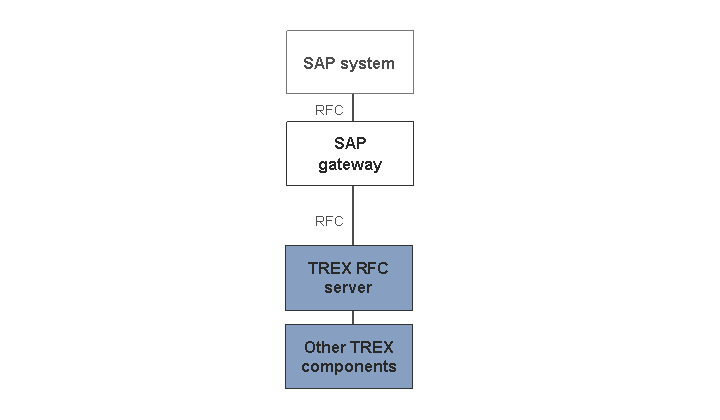
There are different types of RFC connections. To connect a TREX system, the system supports the activation type 'Registration'. With this activation type, one or more TREX RFC servers register with the SAP gateway and maintain a constant connection to it.
With regard to the SAP gateway, there are two variants:
Communication takes place using the local SAP gateway of the application server.
Communication takes place using a central SAP gateway.
Local SAP Gateways for the Application Servers
With this variant, each application server sends the requests to its local SAP gateway. On the TREX side, TREX RFC servers are registered with each local SAP gateway. The TREX configuration depends on the structure of the SAP system. In addition, you must distinguish between TREX RFC servers in single-thread mode and those in multi-thread mode during configuration:
TREX RFC Servers in Single-Thread Mode
In the case of TREX RFC servers in single-thread mode, there are at least as many RFC servers (instances/processes) running on each TREX host as there are application servers. Each RFC server instance connects itself through a SAP gateway that runs locally on each application server. The graphic below depicts this.

TREX RFC Servers in Multi-Thread Mode
In the case of TREX RFC servers in multi-thread mode, exactly one RFC server (instance/process) runs on each TREX host and within this one RFC server, at least as many threads are started as there are applications servers. The graphic below depicts this.

 Note
Note
The multi-thread mode is recommended for the TREX RFC server. A single RFC server instance that starts more than one thread in multi-thread mode consumes less memory than many RFC server instances in single-thread mode. (For details of the configuration, see Changing the Number of RFC Server Instances or Threads). In the case of an initial TREX installation, the TREX RFC server is configured for multi-thread mode by default so you do not have to make any changes.
The TREX configuration depends on the structure of the SAP system. Each TREX host runs at least as many TREX RFC servers as there are application servers. If application servers are added to or removed from the SAP system, you must change the TREX configuration.
In the case of a distributed TREX system, each TREX host is connected to each application server in the SAP system. The graphic below depicts this.

Using the local SAP gateways has the following benefits:
The local SAP gateways process the requests quicker then a central SAP gateway.
The SAP gateway is not a single point of failure. If an application server and its local SAP gateway fail, the requests are distributed among the remaining application servers and still continue to reach the TREX system.
Central SAP Gateway
With this variant, communication takes place through a single SAP gateway. The SAP gateway can run on any machine. The SAP system sends all requests to the central SAP gateway. On the TREX side, one TREX RFC server is registered with this SAP gateway in the default configuration. The graphic below depicts this.

The TREX configuration does not depend on the structure of the SAP system. If application servers are added to or removed from the SAP system, there is no impact on the TREX configuration.
The disadvantage of this variant is that the central SAP gateway is a single point of failure. If it goes down, the connection between the SAP system and the TREX system is unavailable.