
 Completing the Layout of the
Application
Completing the Layout of the
Application 
In the following section, you complete the interface elements.
Procedure
...
1. In FormView, switch to the Layout tab page. The following interface elements already exist:
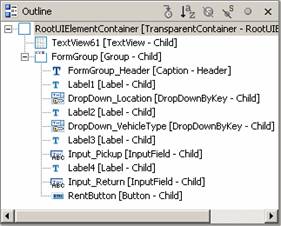
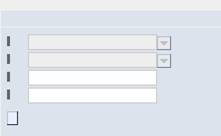
2. Add new properties for the following interface elements or bind them to the appropriate context elements and actions:
Properties |
Value |
TextView61 of the type TextView |
|
text |
Web Dynpro I18N – Quick Car Rental |
FormGroup_Header with Caption type |
|
text |
Rental Settings |
DropDown_Location with DropDownByKey type |
|
selectedKey |
|
Label1 of the type Label |
|
labelFor |
DropDown_Location
|
DropDown_VehicleType of the type DropDownByKey |
|
selectedKey |
|
Label2 of the type Label |
|
labelFor |
DropDown_VehicleType |
Input_Pickup with InputField type |
|
value |
|
Label3 of the type Label |
|
labelFor |
Input_Pickup |
text |
Pickup Date
|
Input_Return with InputField type |
|
value |
|
Label4 with Label type |
|
labelFor |
Input_Return |
RentButton of the type Button |
|
onAction |
Rent |
text |
|


3. Save the current status of the metadata.
Result
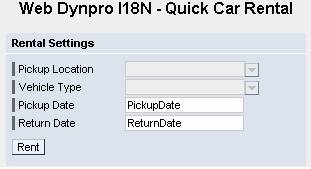
You have completed the layout of FormView:
Next Step:
Creating the Warning Message and Implementing onActionRent()