
 Creating a Warning Message and Implementing
onActionRent()
Creating a Warning Message and Implementing
onActionRent() 
If the user of the example application chooses Rent without first specifying a vehicle type, an appropriate warning message must appear. If the user has selected a vehicle type, ResultView displays the vehicle type.
In the following procedure, you implement a warning message in the message pool and the onActionRent() method. You can display the warning message on the user interface using the IWDMessageManagerinterface. You can access this interface in the controller code using the shortcut variable wdComponentAPI.
Messages of the type: ERROR, WARNING, or STANDARD are stored as constants in the interface IMessage<Name der Component>.java which is generated by the generation framework on component level.
Procedure
Creating a Warning Message
...
1. Open the message pool of the LanguagesComp.(LanguagesComp à Message Pool)
2.
Add a new message
by choosing  .
.
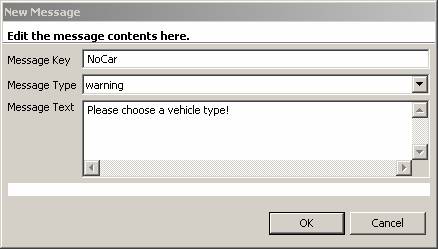
3. Under Message Key, enter NoCar. Under Message Type, enter warning. Under Message Text, enter Please choose a vehicle type, and choose OK.
4. Save the current status of the metadata.
Implementation of the Method onActionRent()
5. Open FormView and switch to the Implementation tab page.
6. Add the following source code to the method onActionRent():
onActionRent() |
public void onActionRent(com.sap.tc.webdynpro.progmodel.api.IWDCustomEvent wdEvent ) { //@@begin onActionRent(ServerEvent) String vehicleType = wdContext.currentContextElement().getVehicleType(); //if no vehicleType was choosen if (vehicleType == null){ IWDMessageManager msg = wdComponentAPI.getMessageManager(); msg.reportMessage(IMessageLanguagesComp.NO_CAR, null, false); } else{ //if a vehicleType was selected navigate to ResultView wdThis.wdFirePlugOutRent(vehicleType); } //@@end } |

You no longer need to make the imports required to display the message, since they have already been defined in the project template.
Next Step:
Creating Dynamic Texts and Completing the Application