
 Specifying Authentication for Access to the
Web Dynpro Client
Specifying Authentication for Access to the
Web Dynpro Client 
Use
The first step is to specify authentication for the Web Dynpro application. Afterwards, only users who are successfully authenticated on the AS Java can access the Web Dynpro car rental application.
For this step, you will set the Authentication flag to true in the application’s properties.
Prerequisites
|
|
The Web Dynpro perspective is displayed in the SAP NetWeaver Developer Studio. |
|
|
The Web Dynpro project, TutWD_CarRental, is displayed in the Web Dynpro Explorer. |


Procedure
...
1. Expand TutWD_CarRental ® Web Dynpro ® Applications.
2. Select the CarRentalApp with a double-click.
The properties sheet for the car rental application appears.
3. Choose the Application properties tab page.
4. To add the authentication property, choose New.
5. In the dialog that follows, select Pre defined as the property type.
6. Choose Browse… . and select Authentication as the property in the dialog that follows. Choose OK to continue.
The name sap.authenticationappears in the Name field.
7. For the Value, select true.
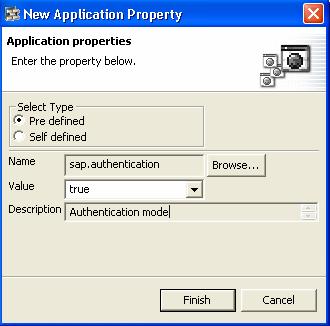
8. Choose Finish to continue.
The sap.authenticationproperty appears in the property sheet. See the figure below.

9. Save the metadata.
Result
After you redeploy the application, users must authenticate themselves to be able to access the Web Dynpro application. However, you have to complete the steps for activating authentication and including the permission checks before you will rebuild and redeploy the application.
Next step: