
 Generating Files for Deployment
Use
With this step you generate file that you can deploy on the J2EE Engine.
Procedure
...
1. Generate a JAR file.
a. Select the JavaMail project.
b. Open the context menu and choose Build Ejb.jar File.
Context Menu Preview

2. Generate a WAR file
a. Select the JavaMailWeb project.
b. Open the context menu and choose Build War file.
Context Menu Preview

3. Generate an EAR File
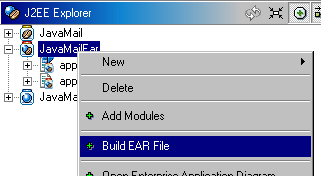
a. Select the JavaMailEar project.
b. Open the context menu and choose Build EAR File.
Context Menu Preview
Result
You have generated a deployable EAR file.
Next Step