
 Deploying the EAR
Use
In this final step, you deploy the JavaMail’s EAR file on the J2EE Engine.
Prerequisites
The J2EE Engine is up and running.
For more
information about how to run the J2EE Engine, see  Starting and Stopping
the SAP System (Windows).
Starting and Stopping
the SAP System (Windows).
Procedure
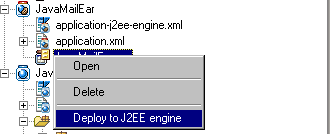
Open the context menu of the EAR file and choose Deploy to J2EE Engine.
Context Menu Preview
Result
Using a Web browser open http://<host>:<port>/jmindex/index.html. This is the start page of the example.