
 Modeling View Compositions in Web
Dynpro
Modeling View Compositions in Web
Dynpro 

You can download the Web Dynpro project for the current tutorial from the Software Developer Network SDN (http://sdn.sap.com -> Web Application Server -> Web Dynpro -> Sample Applications and Tutorials) in two versions: one skeleton version you can use for exercises and one final version (solution) for an immediate build, deployment and run on the Java engine of the SAP Web Application Server.
Task
In this tutorial, you develop a Web Dynpro application that implements a complex view composition. The term view composition describes a set of all view assemblies that can be accessed by navigation. A view assembly consists of normal Web Dynpro views and interface views of Web Dynpro components within the browser window.
You can model view compositions in the Navigation Modeler as part of the Web Dynpro tools. You can use the following options to model view compositions:
· Embedding several views in view sets. You define the division of these view sets into rectangular areas by selecting a particular layout (T layouts, GridLayout).
· Embedding view sets in each other.
· Embedding visible Web Dynpro components using their component interface views. In this tutorial, a Web Dynpro component is embedded using two instances.
· Embedding views and view sets in view layouts by using the ViewContainerUIElement.
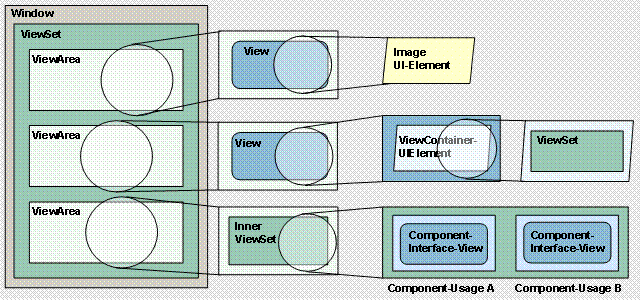
To learn how to use these options, you develop a Web Dynpro application that displays three areas (view areas) in a browser window:
¡ A graphic for displaying the implemented view composition using the Image UI element.
¡ An area in which an inner view set is embedded using the ViewContainerUIElement. You want to execute a simple navigation change in the inner view set between a view and an EmptyView.
¡ An area in which two instances (represented by two component interface views) of a Web Dynpro component can be controlled and displayed.
The schema below is a simplified representation of the view composition implemented in the example application.
Schema for the View Composition
Objectives
By the end of this tutorial, you will be able to:
! |
Embed view sets in each other in the Navigation Modeler |
! |
Use the ViewContainerUIElement to embed views in an outer view |
! |
Embed a view set in the ViewContainerUIElelement |
! |
Use a Web Dynpro component twice (two component usages) and display it using the corresponding component interface views |
! |
Control the lifetime of a component instance from the user interface |
Prerequisites
Systems, Installations, and Authorizations
- The SAP NetWeaver Developer Studio is installed on your PC.
- You have access to the J2EE Engine.
Knowledge
· You already have experience of creating Web Dynpro applications - for example, by working through the Welcome Quickstart Guide (Creating Your First Web Dynpro Application).
· You have basic knowledge of view compositions and navigation, as explained in the tutorial Creating an Enhanced Web Dynpro Application.
· Knowledge of Web Dynpro components, as explained in the tutorial Using Server-Side Eventing in Web Dynpro Components, would be an advantage.
 Next Step: