
 Interactive Scripting Evaluation
Purpose
You can use interactive scripting evaluation to analyze customer responses to questions in interactive scripts. This function works together with SAP Customer Relationship Management (SAP CRM) to track button clicks made by agents as they work through interactive scripts in the Interaction Center (IC). When customers answer questions, agents choose buttons to indicate the answers. This function records these button clicks in system SAP Business Information Warehouse (SAP BW). You can use this recorded information to display:
· An overview of all executed scripts
· The questions and answers of a particular script
· A list of business partners who gave particular answers
· A particular time period
Process Flow
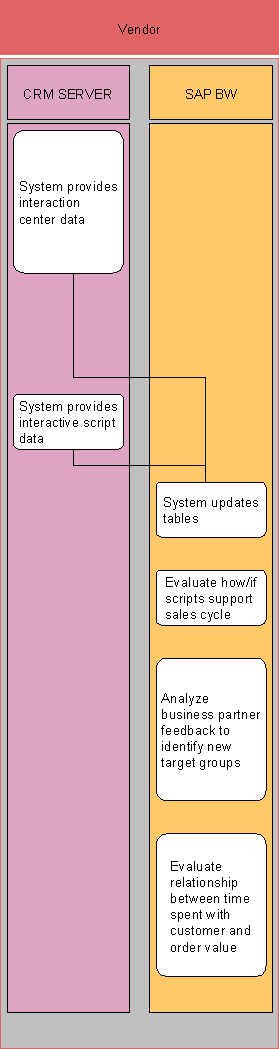
...
1. System provides interaction center data (SAP CRM).
2. System provides interactive script data (SAP CRM).
Data including script questions, answers, time period, and business partners who completed all or parts of scripts is also provided.
3. System updates tables (SAP CRM and SAP BW).
The system uses the information provided by SAP CRM to update tables in SAP BW.
4. Evaluate how/if scripts support the sales cycle (SAP BW).
You can now use the information in SAP BW to determine whether the scripts support your sales campaigns as planned. If so, you can pinpoint exactly how they do so.
5. Analyze business partner feedback to identify new target groups (SAP BW).
6. Evaluate relationship between time spent with a customer and order value (SAP BW).
You can use the details of each interaction to create a ratio of time spent in the interaction to actual value of the order. This way, you can estimate the value of conducting a campaign that includes interactive scripts.
For more information on the existing analysis methods or the analytics tool in SAP BW, the Business Explorer, see Integrated Functions in Other Systems.
Result
You have an overview of the necessary details of the interactive scripts used in your campaigns. You can use this information to determine the effectiveness of existing scripts, areas where you can improve scripts, and even create new target groups for future campaigns.
Example
As a rule, you include a question in all your scripts asking customers to verify their address. At the end of each month, you create a list of all customers who responded that they have a new address. You can group these names together to create a target group of customers who may be in the market for additional products and services.