
 Defining a Text-Input Control
Use
You use this procedure to define the properties, hyperlinks, and event handlers for a text-input control. A text-input control is used to enter or display one line of information on the mobile client application. The label is part of the text-input control as shown below.

|
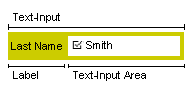
A text-input control:
· Can be bound (associated with a data source property) or left unbound
· Can be associated with a hyperlink
Prerequisites
You have:
· Added a text-input control in a tile
· Identified the property of the data source that you want to associate with this control

Ensure that you have assigned the String data attribute type for this property.
· Identified the business anchor that references the data source to which the required property belongs
The name of the business anchor includes the name of the data source it references.
· Switched to the required change list
Procedure
...
1. In the Solution Explorer, locate the tile for which you want to design the text-input control, click the tile with the secondary mouse button, and choose View Designer.
The Tile Designer window appears.
2. Select the control.
The Properties panel displays the values for the text-input control’s properties.
3. In the Properties panel, enter the appropriate values for the control properties.
For information on each of the properties, see Properties of a Text-Input Control.
4. If you do not need to create a hyperlink, continue with step 5. If you want to create a hyperlink, click the control with the secondary mouse button and choose View Hyperlinks.
For more information, see Model a Hyperlink.
5. If you do not need to create an event handler, continue with step 6. If you want to create an event handler, perform the following steps:
a. In the Tile Designer, click the control with the secondary mouse button and choose Add Handler.
The New Event Handler dialog box appears with default values in the fields.
b. In the Event field, select the event you want to use.
The following table provides information about the events.
Event Name |
Description |
onBoundAttributeChanged |
The value of the BO changes. |
onHyperlinkClicked |
The user chooses the hyperlink. This event occurs before the hyperlink is executed. |
onValueChanged2 |
The value of the text field changes. |

The onValueChanged event is not supported in the current release. Use onValueChanged2 event.
c. Select Edit this handler code after creation and choose OK.
d. In the TODO section, enter the code you require for the event handler.
e. Save the code.
6. Save your entries.
Result
You have defined a text-input control by specifying the properties and event handlers.
See also:
Defining a Multi-Line Input Control
Defining a Static-Text Control