
 Accessing a BSP Application
As we have
already explained, you access a BSP application using the HTTP or HTTPS (Secure HTTP) protocol.
The BSP
runtime environment uses the HTTP framework of the SAP Web Application Server
(compare  Interaction
Model).
In the
Internet Communication Framework (ICF), for a BSP application to function
smoothly you need a node, that is, a service in the service tree (see also Creating a BSP
Application).
Interaction
Model).
In the
Internet Communication Framework (ICF), for a BSP application to function
smoothly you need a node, that is, a service in the service tree (see also Creating a BSP
Application).

Ensure
that after a SAP Web AS has been installed, that all services are inactive and
that they must be activated accordingly. For additional information about
activating services, see Activating and
Deactivating an ICF Service and Note 517484.
As part of automatically creating the corresponding node in the service tree,
the node is also activated only in the case of BSP applications that are newly
created for SAP Web AS 6.20.
A BSP application is addressed and executed through HTTP using a Uniform Resource Locator (URL). The URL of a BSP application has the following structure (default configuration):
<Prot>://<Host>.<domain>.<extension>:<Port>/sap/bc/bsp/<namespace>/<application name>
The protocol Prot is http or https (if configured). Host is the name of the application server that should execute the application. Domain and the Extension comprises several hosts under a common name, although they can either be made up of an individual host or a network. The Port number can be omitted if the default port 80 (http) or 443 (https) is used.
For SAP Web Application Server, the default port number is 1080 (HTTP) or 1443 (HTTPS). The namespace is the namespace ID of the BSP application. SAP applications are delivered in the sap namespace. If you create your BSP application in a separate namespace, it must be used in the URL (see also Creating BSP Applications). The application name is the name of the BSP application as defined in the development environment.
 Here is an example of a URL for BSP test application IT00:
http://myServer.sap-ag.de:1080/sap/bc/bsp/sap/it00
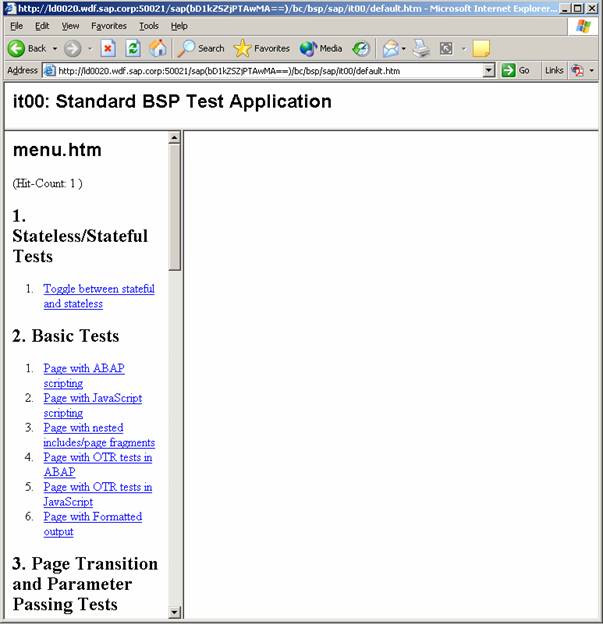
The full name of the server is specified, including the network domain (here: sap-ag.de). Otherwise, the BSP runtime environment returns an error. The full domain must be specified as otherwise there may be problems with HTTP cookies (such as Single Sign On).
If the BSP that you start using Transaction SE80 contains a shortened URL (it does not specify the host name), then proceed as described in Note 434918.
When this URL is started in the Web browser, the BSP application is started and the initial page is displayed (by default this is default.htm).
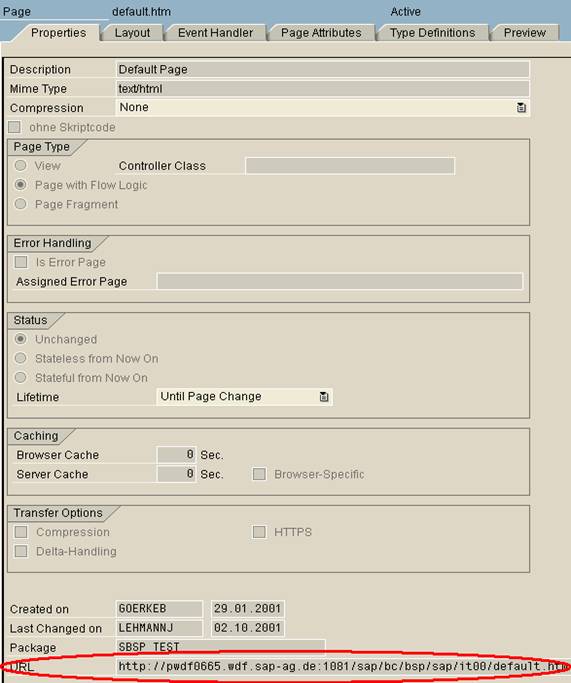
To determine the URL of a BSP or BSP application within the SAP development environment, look on the Properties tab at the right side of the SAP GUI screen.
Example of page default.htm of BSP application IT00:
See also:
Starting and Ending a BSP Application