
 Interaction Center Statistics
Purpose
Statistical data from the communication system is combined with business data from the SAP Customer Relationship Management (SAP CRM) system. The resulting interaction center statistics, together with real-time status information, provide numerous analyses that you can use to monitor and evaluate trends in the interaction center. You can use these analyses for many reasons, including:
· Checking status: Have we reached our targets?
· Analyzing reasons for reaching (or not reaching) targets
· Planning for the future: How can we repeat or improve on this success, or how can we avoid a problem in the future?
Process Flow
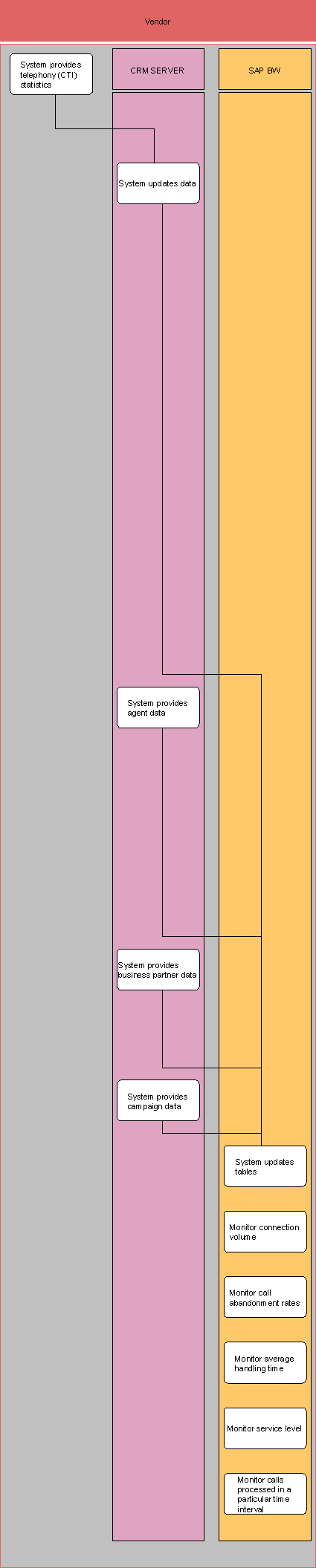
..
1. System provides telephony statistics (third-party CTI software and SAP CRM).
The third-party software provides computer telephony integration (CTI) statistics to the SAP CRM system.
2. System updates data (SAP CRM).
You can use report CRM_CIC_CTI_LOAD to upload the interaction statistics from the communication system. You can find this report in the SAP Easy Access Menu under Interaction Center ® Supporting Processes ® Upload Interaction Statistics.
3. System provides agent data (SAP CRM).
4. System provides business partner data (SAP CRM).
5. System provides campaign data (SAP CRM).
6. System updates tables (SAP CRM and SAP BW).
The system transfers data from SAP CRM to tables in the SAP Business Information Warehouse (SAP BW).
7. Monitor connection volume (SAP BW).
To do this, you use queries 0CRM_CTI1_QCVOL and 0CRM_CTI2_QVOL1.
8. Monitor call abandonment rates (SAP BW).
To do this, you use query 0CRM_CTI_QABRT1.
9. Monitor average handling time (SAP BW).
To do this, you use queries 0CRM_CTI_QHDTM1 and 0CRM_CTI2_QHDTM1.
10. Monitor service level (SAP BW).
To monitor customer wait time, you use queries 0CRM_CTI_QASA1 and 0CRM_CTI2_QASA1.
11. Monitor calls processed in a particular time interval (SAP BW).
You can set a time interval for any of the available queries.
For more information on the existing analysis methods or the analytics tool in SAP BW, the Business Explorer, see Integrated Functions in Other Systems.