
 Automatic Credit Check
Purpose
The automatic credit check allows you to evaluate a transaction based on the credit rating of the payer in SAP R/3, and therefore ensure proper further processing of the transaction document.

For information on credit management in general, see Credit Management.
Prerequisites
· You have completed the CRM Customizing activities under:
Customer Relationship Management ® Basic Functions ® Credit Management
· You have maintained credit management accounts in SAP R/3.
For information on credit management in R/3, see SAP Library ® Logistics ® Sales and Distribution ® SD/FI Credit and Risk Management
· You have completed Customizing for credit management in R/3.
To carry out Customizing in R/3, choose Sales and Distribution ® Basic Functions ® Credit Management/Risk Management

Make sure that the fields in the Reaction column in the Customizing activity Define Automatic Credit Control are set to B or D. To set these fields, choose Sales and Distribution ® Basic Functions ® Credit Management/Risk Management ® Credit Management ® Define Automatic Credit Control.
Process Flow
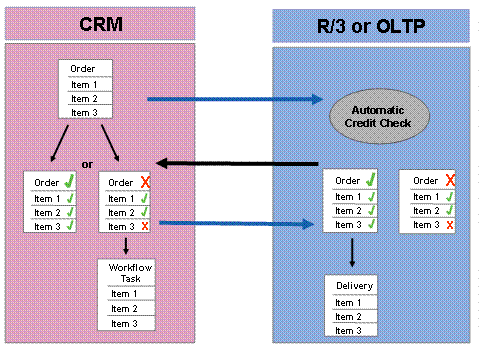
The following graphic shows which CRM credit limit check sub-processes run in SAP CRM, and which run in SAP R/3.
...
1.
You trigger
the credit limit check either automatically when you save a document, or when
you choose  (Credit check) at the top of the item screen
area.
(Credit check) at the top of the item screen
area.
2. CRM then gets ready to do the check, which may actually consist of a series of checks: one for each item category in the document.CRM therefore first groups the items by item category, and, for each group, totals the open values, including tax, of the requested quantity of error-free items.
If the document contains items belonging to one item category, CRM only does one check.
3. CRM calls up the automatic credit check and sends the information on open values to R/3, along with data on the credit group, sales organization, currency, payer and other business partners.
4. R/3 uses this information to determine the R/3 credit group, credit control area, credit management account of the payer, and the account's risk category.
5. R/3 checks the payer's credit standing.
6. It then sends the results of the credit check back to CRM.
7. CRM enters the overall credit status for the document on the Status tab page in the document header, and enters credit status for each item on the Status tab pages at item level. CRM also enters messages, describing the results of the check, in the application log.
If you raise the price or quantity or change currency, business partner, organizational data or delivery dates in SAP CRM, the system automatically performs a new credit check when you save.
Result
If the credit check in SAP R/3 is positive (status: Credit Check OK), then you can process the document further in SAP R/3, e.g. create a billing document.
If the credit check in SAP R/3 is negative, then the transaction is given a status of Credit Check Not OK. This has the following consequences:
· The document is blocked for further processing in the R/3 system. You cannot create any deliveries or invoices.
·
The
responsible credit representative is sent a workflow message informing them
about the blocked transaction.The
representative can then release the transaction manually or trigger another
credit check. For more
information on workflow, see  SAP Business Workflow
for Credit Management.
SAP Business Workflow
for Credit Management.
For further information, see Processing Blocked Transactions.