
 Agent Guidance for Financial Customer
Care
Agent Guidance for Financial Customer
Care
Purpose
In this business process, you can use a variety of functions, such as alerts and interactive scripts, to guide the Interaction Center agent through processing of a customer contact. Alerts use information in the system and provide the agent with the information relevant at decisive points in the customer contact. In addition, interactive scripts provide the agent with predefined questions and answers for each step in processing a customer contact. The system records the customer data and replies for later use.
Agent guidance for Financial Customer Care is particularly suitable for new, part time, or temporary agents. It improves consistency in customer service in your Interaction Center and can also reduce the time required to train agents.
Process Flow
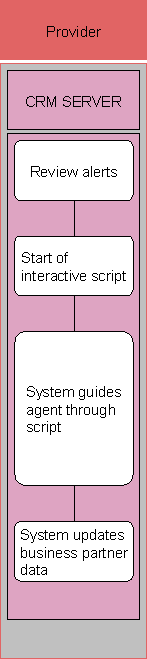
The following business process takes place in SAP CRM:
...
1. Review alerts
You review the alerts displayed by the  alert
modeler.
alert
modeler.
Your system administrator can define alerts that are triggered by various events in the system. You perform the relevant activities according to the content of the alert.
2.
Start of interactive
script
Start a script by choosing the script valid for the current situation.
3. System guides agent through script
You use the questions displayed in the script in your conversation with the customer and record the customer’s responses using the responses listed for selection in the script. The system determines the next question depending on the response and then displays it on the screen.
If the system administrator has made the appropriate settings, you can log the customer data and responses and store them for later analysis. For further information, see Interactive Scripting Evaluation.
4. System updates business partner data
Result
You have used an interactive script to gather information provided by customers. This information is stored in the system for later use.