
 Investigation
Purpose
The system uses the automatic execution of business rules to automatically decline or release Complaints, Complaints with Reference to Billing Documents, Returns, or Used Part Returns. If the circumstances are unclear according to defined criteria, or if automatic processing should not take place for certain defined criteria, the document is transferred to the workflow for investigations. The system determines the employees responsible and forwards the document to them.
An investigation allows you to filter out critical documents such as complaints, returns, or used part returns, and process them at the research, analysis, and approval processing levels. The end result is that the documents are approved or declined.
Prerequisites
You have made all necessary Customizing settings by choosing Customer Relationship Management ® Transactions ® Settings for Investigations.
Process Flow
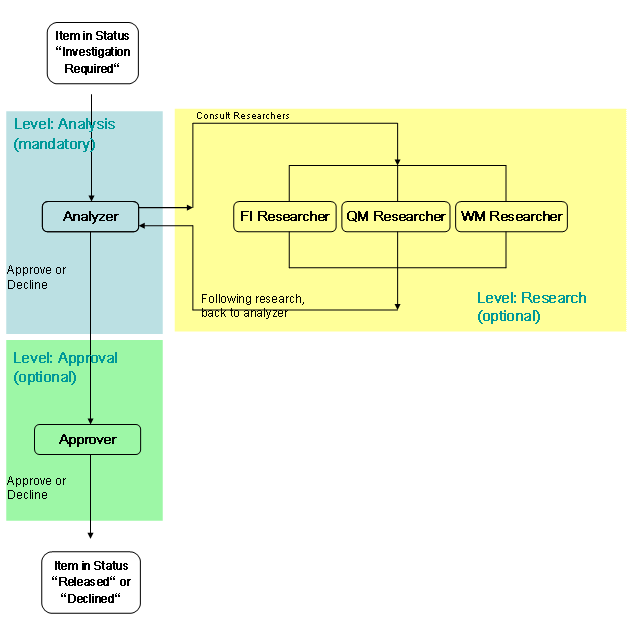
The following graphic illustrates how the processing levels in an investigation fit together:
...
1. An item is processed using the automatic execution of business rules. This method leads to one of the following results:
○ Automatic release (system statuses I2216 and I1004 are activated)
○ Automatic decline (system status I2214)
○ Trigger investigation (system status I2212)
When status I2212 (investigation required) is set, the system starts workflow CRM_MI (WS15100038).
2. At the same time the system starts the investigation, it also defines an agent group for the analysis processing level that is responsible for the investigation process.
Within the responsible analysis agent group, the system uses the Business Add-In (BAdI) Determination of Work Item Recipients(CRM_MI_PROC_DET) to determine the system users.The first work item in the workflow inbox of the Business Workplace is then delivered to these users.
3. The goal of an investigation is to approve or decline an item manually, since the item could not be approved or declined automatically.
4. The analyzer can now either manually make a status decision (approve manually or decline manually) right away, or he or she can first consult the research processing level before making the decision.
5. The research processing level has the task of contributing special information that may not be easily accessible for the analyzer to the investigation process. Examples of such specialized information include special warehouse data or information from external partners.
Agents on the research level complete their processing by offering a suggestion (approve or decline) for the analyzer's decision about this item. This suggestion does not change the status of the item, however.
The agent groups on the research level are always consulted in parallel. In other words, the analyzer can have an item processed by various agent groups on the research level at the same time. When all the research agent groups have completed their work items, the item returns to the analyzer, who can then make the final status decision.
6. BAdI: Check Whether Approval Is Required (CRM_MI_APPROVER) controls whether an approval step is necessary for a status decision, or whether the decision takes effect immediately.
If the BAdI logic requires approval, following the analyzer’s status decision, another work item is created for an agent group in the approval level. The agent group is also determined with BAdI: Check Whether Approval Is Required (CRM_MI_APPROVER).
Further approval can also be requested for the approver’s decision, if necessary.
7. The approval process is completed when the BAdI: Check Whether Approval Is Required (CRM_MI_APPROVER) does not request any further approvals. At this point, the status decision that was made last is effective, and the investigations process ends.
...
See also:
● For more information about the investigation phases, see transaction CRM_MI.
● For more information, see Customizing for Customer Relationship Management and choose Transactions ® Settings for Investigations.