 Conditions for Output

Conditions for Output
Use
You can define conditions for output issue in Customizing for output determination. Two kinds of conditions are available, depending on the determination technology:
Use the attribute of the business object type and/ or the date profile assigned to the transaction type when determining transportable conditions. For the definition of conditions, use the condition editor from SAP Business Workflow. There is further information under
 Conditions for Scheduling and Starting Actions.
When determining conditions, also define the access sequence for output. You can define conditions according to your requirements with ABAP/4.
There is a description of conditions for output in this document.

Note that these conditions cannot be transported.
Prerequisites
You have defined an action profile in which you have defined the required output types and assigned these to output medium (processing types).
Features
In Customizing for output determination there is an overview of conditions in the activity Define Conditions for Output (Old). This overview lists the output medium for an output type.
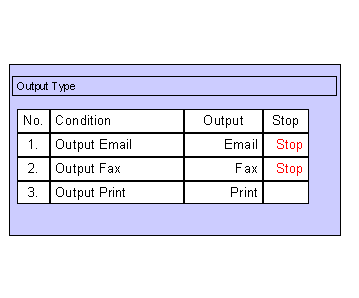
You can define conditions in the screen area Schedule Condition for each condition in this overview. You require knowledge of ABAP/4. There are examples of conditions under
Example: Conditions for Order Confirmation.An output medium and detailed information are given for each task in the screen area Actions and Processing. The details for the processing method (time of processing) and output medium are copied from the action profile. You must enter detailed information here (recipient country, spool settings or Smart Forms).
The system checks the conditions for each form of output (for example, is the standard communication type in the business partner master email?). If the conditions are fulfilled, it issues output using the given output medium. It then checks the next condition.
If a condition is marked with a stop symbol  , the system does not continue to the next condition after issuing this output. It only checks the next condition if the conditions in the first line are not fulfilled. This stops you issuing output, for example, by fax after an email has been sent, because the conditions for sending email and fax were applicable to both.
Activities
In Customizing for output determination, choose Define Conditions for Output (Old).