 Example: Conditions for Order Confirmation

Example: Conditions for Order Confirmation
This example of an order confirmation shows how requirements and access sequences can be set up.
Prerequisites
You have created an action profile ZAB in Customizing with the action type Order Confirmation. You have defined the following processing types (output medium) for the action definition Order Confirmation.
If you call up the activity Define Requirements for Output (old) for output determination in Customizing, you see the following screen in the requirement overview for order confirmation:
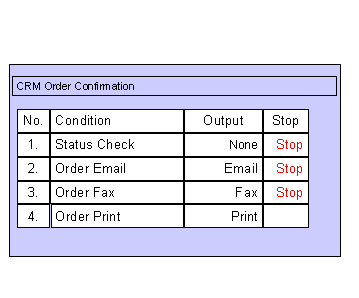
A condition definition is created for each condition in this overview in the screen area Schedule Condition.
The output medium from the action profile is entered for each task in the screen area Action and Processing.
The requirements are coded as follows (an explanation of these code lines can be found under Procedure).
Condition 1: Status check
* T = condition true
* F = condition false
* check if the document is correct
call function 'CRM_OUTPUT_CHECK_DOCUMENT'
exporting
io_context = l_context
importing
ep_result = rule_evaluation_outcome.
Condition 2: Order confirmation by email
* T = condition true
* F = condition false
data: l_deflt_comm type ad_comm.
* determine the communication type from the sold-to-party
call function 'SPPF_GET_COMM_DATA'
exporting
partners = l_context->partner
partner_role = '0001'
importing
deflt_comm = l_deflt_comm.
* check communication type
if l_deflt_comm eq 'INT'.
rule_evaluation_outcome = 'T'.
else.
rule_evaluation_outcome = 'F'.
endif.
Condition 3: Order confirmation by fax
data: l_deflt_comm type ad_comm.
* determine the communication type from the sold-to-party
call function 'SPPF_GET_COMM_DATA'
exporting
partners = l_context->partner
partner_role = '0001'
importing
deflt_comm = l_deflt_comm.
* check the communication type
if l_deflt_comm eq 'FAX'.
rule_evaluation_outcome = 'T'.
else.
rule_evaluation_outcome = 'F'.
endif.
Condition 4: Order confirmation by print
*print the document
RULE_EVALUATION_OUTCOME = 'T'
.
* T = condition true
* F = condition false
Process Flow
The system checks the conditions in the given sequence. The conditions in this sequence signify the following:

If the system finds from the conditions that output, for example, should be sent by fax, but that no fax number has been entered in the business partner master, the system cannot send output. Output determination terminates as the output is seen as having been successfully processed.