
 Copying
the Sales Structure from R/3 to CRM Enterprise

Purpose
If you use the R/3 System as a backend system in CRM, you need the sales structure from the R/3 System in order to transfer or create master data (for example, business partner, products, and conditions) in CRM.
The following documentation explains how you can transfer the sales structure from Sales and Distribution (SD) of the R/3 System to CRM Enterprise.
By copying the sales structure, you can ensure that the structures in the R/3 OLTP System and in CRM Enterprise correspond as far as possible. Corresponding sales structures is a prerequisite for being able to replicate sales documents into R/3 and exchange master data (for example, business partner and products) between systems.
Prerequisites
· You have set up a sales structure in R/3. You can find further information under Defining the sales structure in the OLTP R/3 System.
· The connection to the R/3 System has been set up. You can find further information under Communication Setup Overview.
· You transferred the distribution channels, and divisions if required, during the initial data transfer for Customizing objects. You can find further information under Initial Load of Customizing Objects.
· You have chosen which version of the organizational model to use.
Process Flow
...
1. You execute the program for transferring the sales structure. You can find the program in the Implementation Guide (IMG) for Customer Relationship Management under Master Data ®Organizational Management ® Data Transfer ® Copy R/3 Sales Structure. See the information in the IMG documentation.
2. The system copies the sales structure, or the selected sales areas.
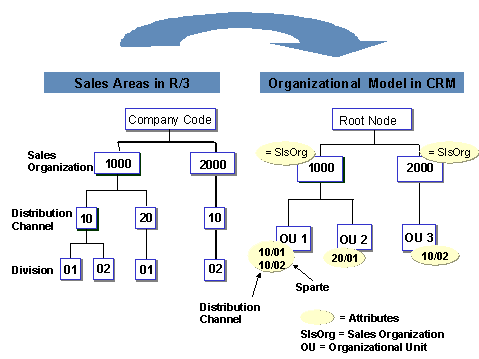
To ensure a structure that matches the R/3 sales structure as far as possible, and at the same time to make use of CRM Organizational Management options, the R/3 sales structure is displayed as follows:
¡ An own organizational unit is created for sales organizations, distribution channels and sales groups.
¡ If you use the standard backend integration version of the CRM organizational model, if several sales offices are assigned to one sales group in the R/3 System, the first assignment is transferred during copying. A sales group cannot be assigned to several offices in CRM Enterprise. If you use the enhanced backend integration version of the CRM organizational model, all organizational unit assignments are transferred during copying. Organizational units can be assigned to several units.
¡ The currency of the company code of the R/3 sales organization is assigned as an attribute of the corresponding sales organization in CRM Enterprise.
¡ Distribution channel and division are displayed as an attribute of their own organizational unit.
3. If you are not using a header division and the system can determine a unique R/3 dummy division (R/3 header division), it enters this division automatically.
4. In order to be able to use the organizational model in CRM Organizational Management, carry out the following post-processing steps according to the requirements of your enterprise in the IMG for Customer Relationship Management under Master Data ®Organizational Management ®Organizational Model ®Change Organizational Model:
...
a. Check the descriptions of the organizational units and change these to appropriate names, if required.
b. Complete missing organizational units, for example organizational units for Sales or Service processes.
c. Assign further attributes, for example postal code area and product groups for the required scenarios (Sales or Service).
d. Complete positions and assign employees to the positions. We recommend you assign only one employee to one position if you are also using CRM Territory Management.
You can find more information on editing the organizational model under displaying/editing objects.

See of the following notes for executing the program for copying the R/3 sales structure:
§ If the organizational model is created automatically with this program, a possibly already existing organizational model is not changed or overwritten. For this reason, ensure that organizational units or structures have not already been created manually in CRM Enterprise before executing the report. Otherwise errors may occur during organizational data determination and during business partner and product data maintenance, as two parallel structures exist in the system.
§ For this reason, you can execute this program only once. Where necessary, you have to make corrections manually in Organizational Model Maintenance.
§ You cannot undo the organizational model according to the R/3 sales structure in CRM Enterprise once it has been created.
Example
The following graphic shows how a simple sales structure from the R/3 System is displayed after transfer to CRM Enterprise:
See also:
Creating the organizational model manually in CRM