
 Collection Object
Grouping
Collection Object
Grouping 
Use
With  Grouping, you
can choose which Business Content objects are to be
collected. By default,
only those objects that are absolutely necessary for an object’s
activation are collected. By making the appropriate selection, you can also
collect objects that are required for the activation of other objects that
were collected at the same time.
Grouping, you
can choose which Business Content objects are to be
collected. By default,
only those objects that are absolutely necessary for an object’s
activation are collected. By making the appropriate selection, you can also
collect objects that are required for the activation of other objects that
were collected at the same time.
Features
You can group objects in the following ways:
Required Objects Only
Only those objects that are really necessary for the action, that is, copying or transporting the selected objects, are taken into account (minimal selection).

The following applies for InfoObjects and InfoCubes, for example:
§ With InfoObjects, the corresponding attributes are also collected, as are the application components to which the InfoObject is assigned.
§ With InfoCubes, the InfoObjects contained in the InfoCube as well as the InfoArea are collected.
Data Flow Before
Those objects are collected that submit data to a collected object.
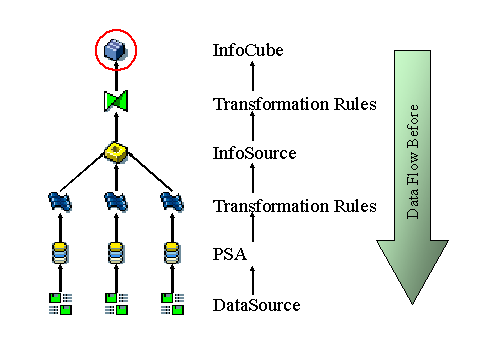
If your start point is an InfoCube, all those objects that are in the data flow before the InfoCube, and are therefore necessary for providing data to the InfoCube, are collected. This includes, for example, transformation rules and InfoSources.
So that these objects can be activated, all the corresponding objects required for these objects have to be collected in addition. For activating an InfoSource, InfoObjects may also be necessary which are not contained in the InfoCube and have therefore not yet been collected. However, for these additional objects, the objects that come before them in the data flow are not collected.
The following graphic shows this example in more detail:
Note the following when activating DataSources:
DataSources are activated remotely from the BI system and are thus subject to an authorization check. You need role SAP_RO_BCTRA. Authorization object S_RO_BCTRA is checked. The authorization is valid for all DataSources of a source system.
In the BI system, the D versions of the DataSources exist if they were replicated to the BI system when connecting to the source system or when replicating for an application component or a source system.
The system collects in BI the DataSources for those objects that lie at most one level before the selected object since this is sufficient for supplying transaction and master data.
If for example this object is an InfoCube, the following DataSources are collected:
· DataSources from which the corresponding InfoSource supplies the InfoCube with transaction data (see above graphic)
· DataSources from which the master data of the InfoObjects contained in the InfoCube originate (characteristics of the InfoProvider as well as their display and navigation attributes). No DataSources are collected for the attributes of these InfoObjects.
When the objects are collected, the system already checks the authorizations remotely. The system issues a warning if you do not have authorization to activate the DataSources.
If in the BI system you trigger the transfer of the Business Content to the active version, the results of the authorization check refer to the cache.
If you do not have the necessary authorization for activation, the system issues a warning for the DataSources. The system issues an error for the corresponding source system dependent objects (transformations, transfer rules, transfer structure, InfoPackage, process chain, process variant). In this case you can manually transfer the required DataSources in the source system from the Business Content via Customizing of the extractors, replicate them in the BI system, and then transfer the corresponding source system dependent objects from the Business Content again.
If you have the necessary authorizations for activation, the DataSources in the source system are transferred to the active version and replicated in the BI system. The source system dependent objects are activated in the BI system.

Remote activation is not supported in source systems and in BI systems with a BI Service API release lower than 7.0. In this case you must manually activate the DataSources in the source system and then replicated them to the BI system.
See also:
 Installing Business
Content DataSources
Installing Business
Content DataSources
Metadata Upload for SAP Systems
Data Flow Afterwards
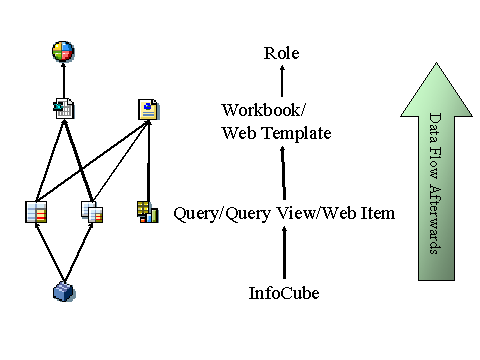
Objects are collected that receive data from a collected object.
For example, if your start point is an InfoCube, all those objects that are in the data flow after the InfoCube, and are therefore reporting objects that serve to display the data stored in the InfoCube, are collected. This includes, for example, queries and Web templates. So that these objects can be activated, all the corresponding objects required for these objects have to be collected in addition. For activating a role, additional workbooks that are based on other InfoCubes may also be necessary. However, for these additional objects, the objects that come after them in the data flow are not collected. These additional workbooks cannot be used for reporting unless they are transferred from the Business Content by some other means.
The following graphic shows this example in more detail:
Data Flow Before and Afterwards
All objects are collected that either deliver or submit data.
For example, when using an InfoCube, the objects necessary for activating the InfoCube are collected together with other objects that are required for activating those objects collected as well. This includes objects positioned both before and after the InfoCube in the data flow.
With the InfoCube, all incoming data streams and the evaluation string are activated. Both are then completed with data streams, enabling a complete evaluation in the workbooks.
The restriction that the system does not collect all objects if you have set In Data Flow Before and Afterwards or In Data Flow Afterwards, is applied for performance reasons.
Optional Objects
In the context menu, you can select the Add Optional Objects option. The where-used list is called and all objects that use the selected object are added. In addition, all objects required for these objects are collected. Otherwise it may not be possible to activate these objects.
For example, an InfoCube may be used by transformation rules and queries.