
 Status Management for a Financial
Service Quotation
Status Management for a Financial
Service Quotation 
Purpose
During the account origination process, a financial service quotation (FS quotation) is assigned a number of statuses in a fixed sequence. You can set some statuses manually, while the system sets other statuses automatically after certain functions have been performed.
For general
information on statuses in business transactions in SAP Customer Relationship
Management (SAP CRM), see  Status Management in
Business Transactions.
Status Management in
Business Transactions.
Prerequisites
In status management for an FS quotation, the system uses functions that are located not in SAP CRM but in external systems. These functions are connected both synchronously, for example for the calculation of the payment schedule, and asynchronously, for example for the distribution of loan data.
For more information, see Connecting External Systems.
Process Flow
The following graphic illustrates the possible system statuses of an FS quotation:
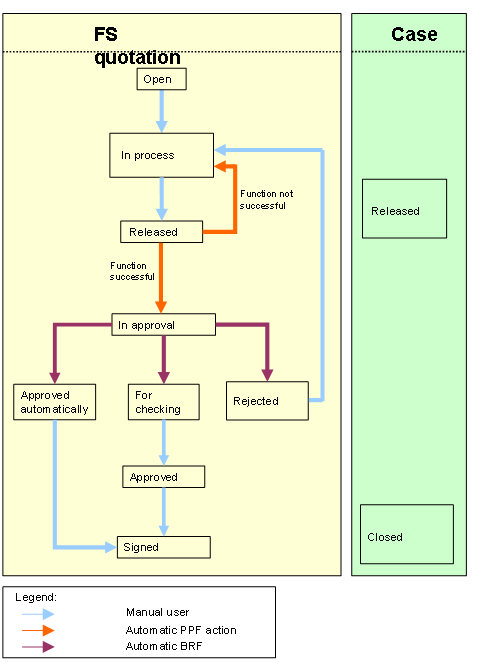
During the account origination process, the FS quotation goes through the following statuses:
1. When you create an FS quotation, the document has the initial status Open.
2. When you maintain the FS quotation, you set the status to In Process.
3. When you have finished maintaining the FS quotation, you release the quotation. You set the status to Released at quotation header level.
When you release the FS quotation, you automatically set this status for the associated case as well.
4. The system performs a number of actions in a particular sequence (action choreography). In the standard system, for example, the system carries out the following actions:
○ Calculating the Payment Schedule

These functions are located not in SAP CRM but in external systems. To be able to use these functions, you must have connected SAP CRM to the relevant backend systems.
5. When the system has successfully carried out the functions for the FS quotation, it sets the status of the quotation to In approval.
If the system cannot carry out the functions successfully, an error message is displayed. The system sets the status back to In process, you maintain the quotation and can then release it again.
6. If the FS quotation has the status In Approval, the system carries out checks that you define using the Business Rule Framework (BRF).
The following checks exist in the standard system, for example:
○ Checks on completeness and correctness of the document. For example, you can check in Case Management whether all the required documents exist for the case to which the FS quotation belongs.

If errors occur during the BRF checks, indicating for example that not all the required documents are available in Case Management, proceed as follows:
■ You set the status of the quotation to In Process and correct the error.
■ When you have completed your corrections, you restart the BRF checks. To do this, select the action BRF Call on the Planned Actions tab page in the header of the FS quotation.
■ When the system has run through all the checks, you release the quotation again.
○ Check on the FS quotation and check on whether the loan sum exceeds the value of € 1,000,000 (application rating).
These checks can have the following results:
■ The check on the quotation shows that the quotation is not possible in its current form.
The system sets the status Rejected. You can manually set the status to In process and make the corrections.
■ The check on the quotation is mediocre or the loan sum exceeds the value of € 1,000,000. If one or both of these checks is positive, the system starts an approval process:
The system sets the For checking. You can check the FS quotation again and then set the status Approved.
■ The rating the quotation is good and the loan sum does not exceed the value of € 1,000,000: The system approves the quotation automatically and sets the status Automatically approved.
7. When the FS quotation has the status Approved or Automatically approved, you print out the quotation and the contract partners sign it. When all contract partners have signed, you set the status Signed.
When the status of the FS quotation is Signed, the system automatically sets the status of the associated case to Closed.
Result
SAP CRM distributes the data of the FS quotation to the connected backend systems, that is to say it distributes the collateral data to Collateral Management and loan data to Loan Management.
For more information, see Distributing Loan Data and Distributing Collateral Data.
See also:
Business Rule Framework in Account Origination.
Case Management in Account Origination