
 Delivery and Use of Partner Content in the OLTP
System
Delivery and Use of Partner Content in the OLTP
System 
Purpose
You can use this process to enable your business areas or other partners to import/use partner Content. The basis of the process is object versioning for partner Content as well. (See Delivery of Business Content in the OLTP System by SAP).
Prerequisites
Prerequisites in the development and test/delivery system for partner Content.
· You have already made system settings in the OLTP system.
Prerequisite in the partner system into which Content is imported:
· You have ensured that the OLTP system in which the delivered Content is to be delivered, is not defined as a Content development system. This can be checked in the Maintenance of Content Settings (transaction rsa0).
· You have created the namespace as changeable in the OLTP system (role C).
· You have ensured that a generation namespace has been released in the BW system in which the DataSources are to be copied.
· You have created and released the same generation namespace in the OLTP system.
Also see:  Using Namespaces for
the Development of BW Objects
Using Namespaces for
the Development of BW Objects
Process
...
1.
Deliver the
objects (DataSources and application component hierarchies in the D version,
extract structures and extractors) from the Content test/delivery system with
a delivery transport (see System
Environment). Note: With objects in the A and D versions, the
system only writes the D versions of the object to the transport
request. You ensure this by selecting the Content
Development field in the Maintenance of Content Settings screen
(transaction RSA0) in the system.
2. After the import of the D versions, your partners (business area) can activate the DataSources and application component hierarchies and use them as with the Business Content provided by SAP.

Using application component hierarchies delivered as partner Content:
All application component hierarchies in the D version are merged in a hierarchy upon activation in the OLTP system (transport object R3TR DSAA APCO_MERGED). This hierarchy also contains the partner Content hierarchy. The merged hierarchy is copied as a single object in BW. The partner application component hierarchy is therefore not displayed as a separate object in the BW system.
The following graphic illustrates the process for DataSources and application component hierarchies.
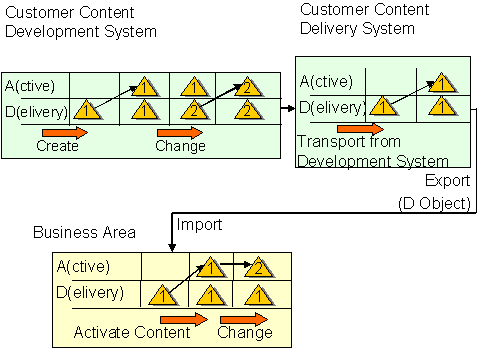
For
objects which are seen as Content objects in a system (with a changeable
namespace and where the system is a Content development system), the system
automatically activates the DataSource in an after-import method for the D
version.
You can find
information about the activation of Business Content in the OLTP system for a
business area under Transferring
Application Component Hierarchies and Transferring Business
Content DataSources. Object changes are saved in the active version
in this system. The D version remains unchanged.