
 Business Content Delivery in OLTP Systems by
SAP
Business Content Delivery in OLTP Systems by
SAP 
Purpose
The standard procedure used in the delivery of Business Content by SAP is the model for the delivery of Content by partners and partners.The basis of this process is also object versioning in the OLTP system.
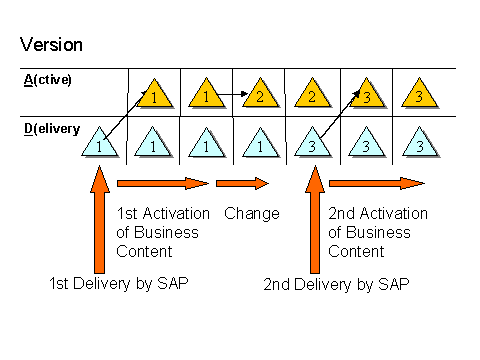
The DataSources delivered with Business Content by SAP appear in a delivery (D) version. If you want to use a Business Content DataSource to transport data from an OLTP system into a BW system, you need to transfer this DataSource from the D version into the active version (A version).
The DataSources have been assigned to application components in the OLTP system. You also need to transfer the merged application component hierarchies from the D into the A version of the merged application component hierarchy (APCO_MERGED). This enables the DataSources to be displayed in this hierarchy in the OLTP system and in the source system view of the BW Administrator Workbench - Modeling.
Upgrading SAP Business Content has no effect on objects that you already use productively, since only the D version is overwritten.

When activating Business Content application component hierarchies and DataSources, the active partner version is however overwritten when the D version is transferred.
The extract structure (object type R3TR TABL) and extractor (object type: LIMU FUNC) behave differently. These objects do not have a D and A version. For this reason, we recommend a versioning with Content generation. This prevents incompatible changes to the productive scenario from arising.
The following graphic shows how SAP Business Content objects (DataSources and application component hierarchies) are used in a partner system with a double delivery:
Process
In the SAP Content delivery system, the A and D version of DataSources and application component hierarchies are stored in identical forms. There are two transport objects for each object: An A and a D object. In accordance with the system settings, the system writes the suitable object to the transport request. When a Content development system is involved, the system chooses the D object.
The next graphic illustrates how Business Content (DataSources and application component hierarchies) is delivered by SAP.
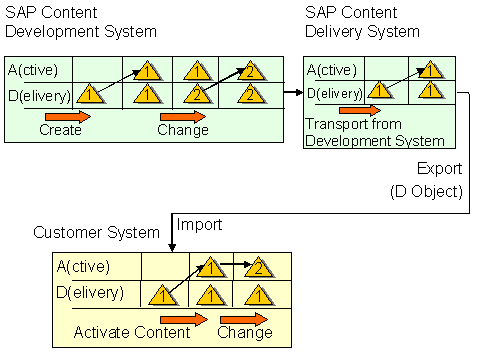
For
objects which are seen as Content objects in a system (with a changeable
namespace and where the system is a Content development system), the system
automatically activates the DataSource in an after-import method for the D
version.
You can find
information about the activation of Business Content in the OLTP system for a
business area under Transferring
Application Component Hierarchies and Transferring Business
Content DataSources. In a partner system, BW object changes are
saved in the active version. The D version remains
unchanged.