 Creating BSP Applications and Pages

Creating BSP Applications and Pages
Prerequisites
You have implemented the
Online Bookshop as a BSP application.Procedure
Make a copy of the existing BSP application to a new one, with a freely definable name in the customer namespace. In our example, we used
tutorial_4. To do this, go to the Web Application Builder and open the BSP application tutorial_3. Right-click on the BSP application and choose Copy.In the popup that appears, enter ‘
tutorial_4’ in the field Target Application.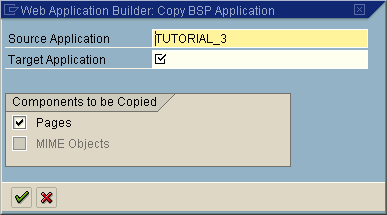
In the field Target Application, enter the name of your new BSP application.
Now create from scratch the following BSPs:
|
Page Name |
Meaning |
|
basket.htm |
Shopping Basket Page
This page implements the shopping basket function. The user is taken to this page when he or she places a book in the basket, or modifies the contents of the basket. |
|
order.htm |
Order Page
The user is taken to this page when he or she wants to order the current contents of the shopping basket. At this stage, the user has to authenticate himself or herself, otherwise the ordering process cannot continue. |
|
newuser.htm |
Registration Page
This page is used to register new customers. The customers enter their e-mail address to identify themselves. |
|
cnewuser.htm |
Registration Confirmation Page
This page confirms that a new customer has registered successfully. The customer’s data is stored in the database table BSCUSTOMER of the package in question (see Data Model for the Bookshop Tutorials). |
Some existing pages and page fragments must be changed.
These modifications are described in the following sections:
Modifying the Title Bar head.htm Modifying the Order Confirmation Page corder.htm Modifying the Entry Page default.htm Modifying the Results Page results.htm Modifying the Search Page search.htm