
 Partner/Product Ranges
Definition
Combination of business partners and products which is valid for a specific time period in pre-defined scenarios (for example, Telesales, Internet Sales), and with which products are offered for sale in specific areas.
Use
You can use this application for maintaining partner/product ranges.
With partner/product ranges (PPR), you can offer your customers the exact products and services that are relevant for them.
This also enables you to avoid certain products being sold.
The combination of products and business partners is always restricted to a time period; that is, in a specific season such as summer, no unsuitable products (for example, Christmas cookies) are sold.
Each partner/product range has a specific organizational frame, that is, the sales organization in which the combination of products and business partners is valid.
The system also specifies a scenario (Internet, Mobile, Telesales) in which a specific combination is valid.

Business partners and products mentioned in this documentation also implicitly refer to their references, that is, business partner group hierarchies, marketing segments, product categories, product hierarchies and product catalogs (variants, views) and individual objects.
Sales Transaction and Applications
·
Partner/product
ranges (PPRs) are used in a check in the  sales
transaction. During the check, the system attempts to find a
partner/product range in which the product item, the sold-to party and the
check date are maintained. If no partner/product range is found, the system
abandons its search with a corresponding message.
sales
transaction. During the check, the system attempts to find a
partner/product range in which the product item, the sold-to party and the
check date are maintained. If no partner/product range is found, the system
abandons its search with a corresponding message.
· You can use the search help in the Products field in the item overview for the sales transaction to link to a specific business partner and display the valid products. This is applicable for PPRs that were created in the maintenance transaction or in contract processing.
· The check can be used by other applications in the background (for example, in Marketing Planner).
Product Proposals
Product proposals
can be derived from partner/product ranges. Products can be selected and
copied into sales items.
Sales contracts
Partner/product
ranges are used as a product references. For more information, see contracts.
Catalog views
Catalog views are
partner/product ranges.
Structure
A partner/product range consists of the following elements:
· Header
· Any number of items with as many number of references as required to one of the following objects:
¡ Other PPRs
¡ A combination of business partners, products and validity periods
Partner/product ranges can reference other partner/product ranges, that is, if specific products are maintained in one partner/product range, they don’t have to be entered again when a new partner/product range is created. All the changes made to the initial partner/product range have immediate effect in the partner/product ranges that use this as a reference. You can use a complete PPR as a reference, or all business partners, products and/or validity periods contained in a PPR.
As only a reference to a PPR is saved, all the changes regarding products, business partners and validity periods in the referenced PPR take effect immediately in all referenced PPRs. When using a product hierarchy as a reference, for example, the individual products are not saved, just the reference to the product hierarchy.
The exclusion flag for a partner/product range means that the products contained therein cannot be sold to the listed business partners during the validity period.
Partner/product ranges with exclusion flags have priority: if a partner/product range without an exclusion flag contains a valid combination of products and business partners, but, at the same time, a partner/product range with an exclusion flag is active, the product cannot be sold.
Example
The following graphic contains an example for the structure of a partner/product range.
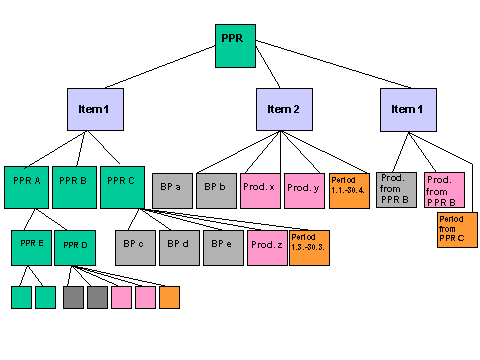
The following graphic contains an example for the structure of a partner/product range item.
