 Balance Transfer
Using this process, you can transfer the balances from funding accounts (such as current accounts or savings accounts) to funded accounts (such as loan accounts) virtually, without changing their available amount.
For this periodic balance transfer you use the report Execute Balance Transfer
. During a balance transfer, the system updates a turnover class for the funded account that is defined in Customizing. As a result, the calculation base for interest calculation, for example, can change.
Process Combinations
 Note
Note
You can combine this process with other processes in Master Contract Management. For an overview of all combination options, see Master Contract Management (FS-MCM).
Prerequisites
You use the
Balance Transfer (FS-MCM-BT)
component.You use the contract element
Balance Transfer: Participants (REOF)
.You use the contract element
Balance Transfer: Priority (BCBT)
.You use the contract element
Calculation Base Adjustment (BCRD).
If you use n:-m relationships, you have created a secondary index for the table
BCA_TRNOVER Turnover Class Update
with the following fields:CLIENT
CONTRACT_INT
TIMESTAMP_CHANGE
TIMESTAMP_CREATE
Settings in Customizing for Account Management (FS-AM)
If you are using Account Management (FS-AM)
as account-managing system, you have made the following settings:
Account product for funding account
You have chosen

Product Management

Product Definition
Account Products
 and created or changed an account product, activated the
 Calculation Base Adjustment
attribute, and made the relevant settings under this attribute node.Account product for funded account
You have chosen
Product Management
Product Definition
Account Products
and created or changed an account product for which the real turnover class
references thelogical turnover class
7000 Transferred Balances
in the Financial Calculator under the product attribute General Settlement
Clearing-Relevant Attributes
Logical Turnover Class
or Real Turnover Class
.Suppression of credit interest calculation on the funding account
You have chosen
Product Management
Financial Conditions
Define Condition Types
and defined a condition type and set the Percentage-Based Reduction
indicator on the amount category.Reduction of the calculation base for debit interest on the funded account
You have chosen
Item Management
Turnover Classes for Flexible Account Balances
Define Turnover Classes
and defined a turnover class for balance transfers for which the Aggregated Balance
andUpdate
indicators are set.You have defined a condition based on the condition type with the
Percentage-Based Reduction
indicator for the funded account and specified the share of the balance transfer in thePercentage Rate Reduction
field.
Settings in Customizing for Master Contract Management (FS-MCM)
In Master Contract Management
you have made the following settings:
Master contract product
You have chosen
Product Management
Product Definition
Master Contract Products
and created a new master contract product for the master contract, activated the feature attribute Balance Transfer
, and defined the field attributes below it.Turnover class for funded account
You have chosen
Master Contract Applications
Balance Transfer
and carried out the Customizing activity Define Update of Turnover Classes
and assigned the turnover class previously defined inAccount Management
to therole for balance transfer - funded account
.Update calculation base adjustment of participating accounts in account-managing systems
You have chosen
General Settings
Business Add-Ins (BAdIs)
General BAdIs
BAdI: Set Up Subprocesses
and created and activated a customer-specific BAdI implementation with the example implementation class CL_EXM_IM_BCA_CN_ADDPROCMAN
.Maximum amount for funded account
You have chosen
Master Contract Applications
Balance Transfer
and carried out the Customizing activity Assign Calculation Base to Balance Determination Basis
.
Master contracts and participating accounts in different logical systems.
You have also carried out the Customizing activities under
Communication with Logical Systems
Account
and under Payment Order
.
Process
Master Data
Create participating account contracts:
Create at least two account contracts based on the account products that meet the above-mentioned requirements:
one
funding account
(such as savings account or current (checking) account)one
funded account
(such as loan)
For more information, see Creating Accounts
Create master contract with the Balance Transfer
feature:
Create a master contract on the basis of a master contract product that meets the above-mentioned requirements.
For more information, see Creating Master Contracts.
If you use n:m relationships, on the
Priority
tab page, you must define the priority of all master contracts involved.For more information, see Editing Priorities.
Choose the
Contract Relationships
tab page and assign the required participating accounts to the master contract:at least one account with the role
funding account
(such as current (checking) or savings account)exactly one account with the role
funded account
(such as loan account account)For more information, see Editing Contract Relationships for Balance Transfers and Displaying Calculation Base Adjustments.
Flow Data
Transfer balances:
Note
Note the prerequisites for the report Execute Balance Transfer
described in the system documentation.
Execute the report
Execute Balance Transfer
(transactionFSOFA/PP_BALDIST
). NoteIf you use n:m relationships, you must execute the report for each priority after the other.
End of the note.The report determines all due master contracts with the
Balance Transfer
feature in accordance with the chosen criteria.The report determines the earliest validity date and the balances of all accounts participating in the period specified.
The report calculates the balances to transfer, taking account of the following attributes:
Threshold amount for the balance to transfer on the funding account
Maximum amount for the balance to transfer using the balance determination basis on the funded account
Priority of the master contract
Ranking of the funded account
The report calls the function module
BCA_IN_ACC_IM_SET_TRNOVCL
, which updates the turnover classes on the funded accounts inAccount Management (FS-AM)
. The system updates the balances of the funding and funded accounts, without changing their available amount.The report updates the due data on the master contracts and details about the transferred balances (table
/FSOFA/DELTA
and table/FSOFA/BALANCE
).
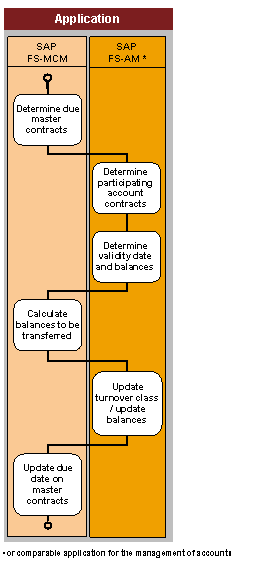
Process flow of balance transfer
Result
The report has transferred the balances from the funding accounts to the funded account virtually, for all due master contracts with the Balance Transfer
feature.
Note
To display the account turnovers for the funding account, on the SAP Easy Access
screen, choose Account Management
Key Figures
Balances, Turnovers, and Key Figures
Display Balances and Key Figures
(transaction BCA_CN_KFG
). Check the turnovers for the turnover class BT01 Transferred Balance
.
After the balance transfer you can start processes for interest calculation (for the participating accounts, for example).
Note
Processes for the determination of charges (such as event charge
and offset charge
for the master contract and settlement charges for account contracts) are independent of the balance transfer itself.
Example
For more information about balance transfer relationships, see Example: Balance Transfer.
More Information
For more information about interest and charge calculation, see Financial Conditions (CA-FIM-FCO).
For more information about account settlements, see Account Settlement.
For more information about combined settlements, see Combined Settlement.