Executing Combined Settlements - Bundle Pricing Calculation
For a combined settlement for the Bundle Pricing Calculation
feature, the system selects all due master contracts and calculates their charges for a given period on the basis of the condition rules. Then the system posts the combined settlement results to the payment details, displays the results, and updates the time periods.
Integration
The Execute Combined Settlement
function is used by the Compensation and Bundle Pricing Calculation processes.
Depending on which of the two features is active in the product of the selected master contract, the system executes a combined settlement either by means of compensation (interest and charges) or bundle pricing calculation (charges). For more information about the process flow of the function with the Compensation
feature, see Executing Combined Settlements - Compensation.
You can undo one or more executed combined settlements by reversing them. On the SAP Easy Access
screen, choose 
Combined Settlement

Reverse Combined Settlement
 or
or Combined Settlement
Periodic Tasks
Reverse Combined Settlement - Mass Run
. For more information about reversal, see the report documentation in the system under Program Documentation
.
Prerequisites
Before you can execute an update run, you must carry out a posting cut-off. The posting date for payment transactions must be after the selection date and the posting date for end-of-day processing must be set.
You have carried out the steps for the bundle pricing calculation process described in the "Process Flow" section.
Features
By means of selection parameters that the report evaluates, you can restrict the selection of master contracts to individual bank posting areas or products. Using the master contract number you can restrict the selection to individual master contracts.
Activities
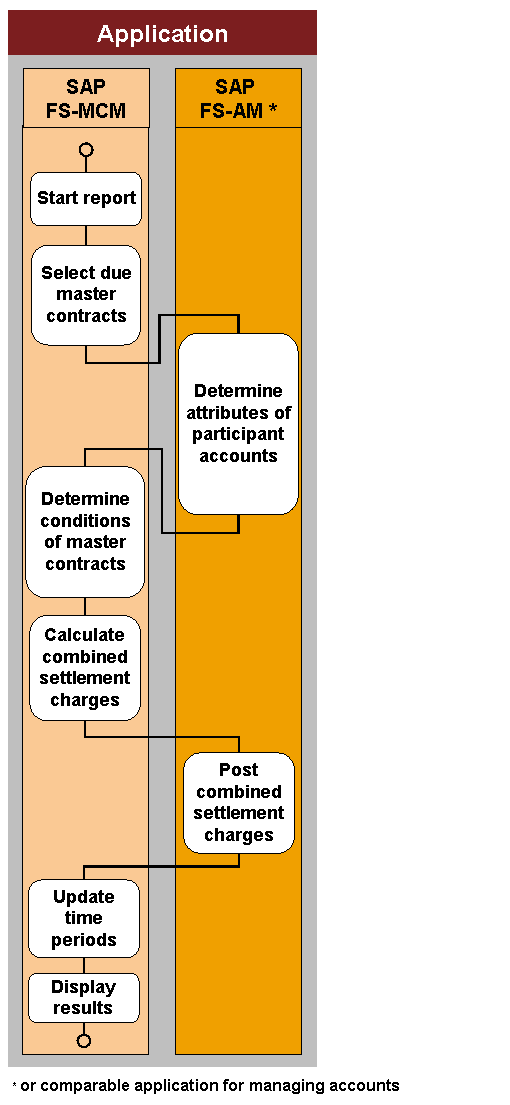
Start the report
You can execute the
Execute Combined Settlement
report either as a single run or a mass run.Using the report
Execute Combined Settlement - Mass Run
, you can execute combined settlements for master contracts that meet the selection criteria and that - according to their time periods - are due, in a mass run.This report is either started automatically by the system during end-of-day processing or by an external job management. You can also start the report on the
SAP Easy Access
screen. Choose Master Contract Management
Combined Settlement
Periodic Tasks
Execute Combined Settlement - Mass Run
.Using the report
Execute Combined Settlement
, you can execute a combined settlement for a master contract on a given settlement date, meaning also outside of the regular time periods. You start this report on theSAP Easy Access
screen under Master Contract Management
Combined Settlement
Execute Combined Settlement
.
For more information about inclusion in end-of-day processing, details about the return values, the application log, and connecting the Postprocessing Office (FS-MCM-PPO), see the report documentation in the system under
Program Documentation
.Select due master contracts
For a mass run, the system selects all master contracts whose combined settlement date is due on the execution date. This date can be periodic settlement dates or extraordinary or manual settlement dates.
For a single run of
Execute Combined Settlement
, the system selects the one master contract you wish to settle on the specified settlement date. Note
NoteTo display the dates for the combined settlement of a master contract that affect its next execution date, on the
SAP Easy Access
screen choose Master Contract Management
Combined Settlement
Edit Combined Settlement Dates
. You can also use the report to create, change, and delete dates for extraordinary and manual combined settlements. For more information, see the report documentation in the system.End of the note.
Determine attributes of the participating accounts
The system determines the attributes of all participating accounts belonging to a due master contract in the account-managing system.
Product
Balances
Counter
Operand values that the system determines with
BAdI: Determination of Operand Values for Bundle Pricing Calculation
Determine conditions of the master contracts
The system determines the conditions and corresponding rules for all due master contracts.
Calculate combined settlement charge
On the basis of the attributes, conditions, and corresponding rules, the system calculates the combined settlement charge for every master contract.
Post combined settlement charge
The system posts the combined settlement charge to the account that you have specified as payment details for every master contract settled.
Update time periods
The system calculates the next due date for every master contract settled and updates the time periods.
Display results
After a mass run, the system generates a log. You can look at this log from the
SAP Easy Access
screen under Master Contract Management
Combined Settlement
Logs
Application Log - Execute Combined Settlement
.After a single run the system displays the results of the combined settlement.
NoteTo display the results of multiple combined settlements of a master contract executed during a certain period, start the report
Display Combined Settlement
on theSAP Easy Access
screen under Master Contract Management
Combined Settlement
Display Combined Settlement
. For more information, see the report documentation in the system.End of the note.
Process Flow
The following figure illustrates the process flow of the Execute Combined Settlement - Bundle Pricing Calculation
function.