 Credit Exposure Stress Run
The Basel II requirements stipulate that banks using the IRB approach must have sound methods for stress testing. The Basel II calculation process provides stress test results that are not based on real data, but on simulated data (stress data).
A Basel II calculation run whose results are not used to calculate the capital requirement for reporting purposes is therefore referred to as a simulation run. A calculation run whose results are used for regulatory reporting is referred to as an update run. A simulation run is different from an update run in that the calculation itself is based on input data or control parameters that have been modified.
Features
If you want to carry out stress tests as part of the credit exposure calculation, you can use either stressed initial data (stressed market data and stressed primary object data) from the Source Data Layer (SDL) or use derivation rules to stress the data. You specify which option you want to use by means of the stress test scenario entered (see Stress Test Scenarios).
 Recommendation
Use modified primary objects from the SDL and modified market data for stress tests.
Stress Tests Based on Stressed Market Data and Stressed SDL Data
The data you use in your stress tests can be modified fictitious market data (market data scenarios) or modified fictitious data for primary objects in the SDL (class determination scenarios). You can also use a combination of the two. For more information, see Scenario.
Prerequisites
Make sure that the following prerequisites are met:
The Foundation component contains stress data for market data. The SDL contains stress data for primary objects. For more information, see Retrieving Stress Data.
You have made the following settings in Customizing for Bank Analyzer:
Under
 Infrastructure
  General Scenario Administration
  , you have created scenarios and assigned these to a composite scenario.
Optional: Under
Processes and Methods Credit Risk Credit Exposure Module Editor Edit Modules , you have created the modules that you want to use in the credit exposure stress run.Optional: Under
Processes and Methods Credit Risk Credit Exposure Scenario Define Modules and Localization Categories for Scenarios , you have assigned modules or a localization category (or both) to the scenarios that you want to use in the credit exposure stress run.
These prerequisites also apply to the update run for calculating the credit exposure. For more information, see Starting the Credit Exposure Run.
Stress Tests Based On Derivation Rules
When stress tests are based on derivation rules, data such as transaction data and partner data is first selected from the SDL. Then the attributes of the primary objects (characteristics) are modified according to simple derivation rules.
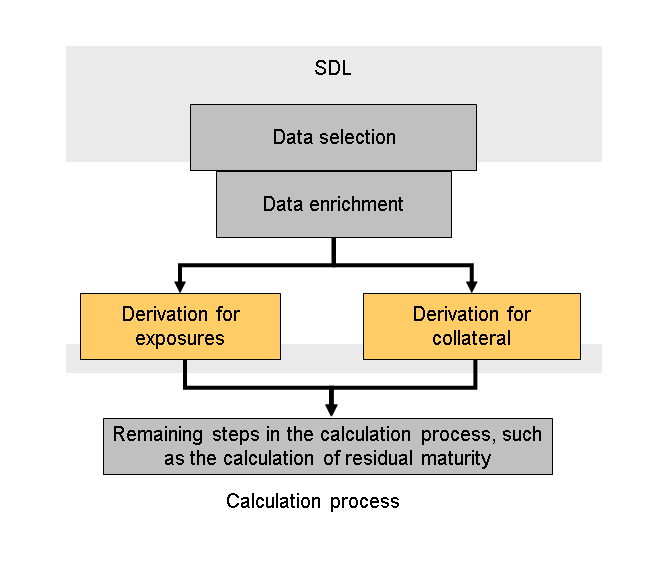
Process of a Stress Test Based on Derivation Rules
Prerequisites
You have made the following settings in Customizing for Bank Analyzer:
Under
Infrastructure General Scenario Administration , you have created scenarios and assigned these to a composite scenario. Note that the scenario assigned to the modules is assigned to this composite scenario by means of data category CRE_D (scenarios in CRE calculation).Optional: Under
Processes and Methods Credit Risk Credit Exposure Module Editor Edit Modules , you have created the modules that you want to use in the credit exposure stress run.Optional: Under
Processes and Methods Credit Risk Credit Exposure Scenario Define Modules and Localization Categories for Scenarios , you have assigned modules or a localization category (or both) to the scenarios that you want to use in the credit exposure stress run.Under
Processes and Methods Credit Risk Credit Exposure Scenario Derivation for Scenarios , you have made the appropriate settings for the derivation process.You can still change the rule entries after your system has gone live. You do this on the SAP Easy Access screen under
Bank Analyzer Processes and Methods Credit Risk Credit Exposure Support for Stress Tests Edit Rule Entries for Derivation Steps .
Activities
On the SAP Easy Access screen, choose
Bank Analyzer Processes and Methods Credit Risk Credit Exposure Support for Stress Tests Start Credit Exposure Stress Run .Start a stress run for the credit exposure calculation in the same way as for an update run (see Starting the Credit Exposure Run).
Enter the ID of the composite scenario that contains the scenario that you want the system to apply.
The results of the stress calculation run are stored in the Results Data Layer (RDL) or in the Result Database (RDB) in the same way as those generated by a normal calculation run. However, the results from the stress tests can still be identified. You can display the results in run administration. You do this on the SAP Easy Access screen under Bank Analyzer Processes and Methods Credit Risk Credit Exposure Support for Stress Tests Overview of Credit Exposure Stress Runs , as described in the Overview of Credit Exposure Runs.
You can also delete the stress calculation runs in the same way as credit exposure runs You do this on the SAP Easy Access screen under Bank Analyzer Processes and Methods Credit Risk Credit Exposure Support for Stress Tests Deletion Report for Stress Runs , as described in the Deletion of Credit Exposure Runs.
The results of the stress calculation run on level 2 of the credit exposure calculation are then used to create the worklist for extracting stressed results from Bank Analyzer to SAP NetWeaver Business Intelligence (BI).