
 Architecture and Functions of the SAP Web
Dispatcher
Architecture and Functions of the SAP Web
Dispatcher 
SAP Web Dispatcher as an Infrastructure Component
The SAP Web dispatcher is located between the Web client (browser) and your SAP system that is running the Web application.
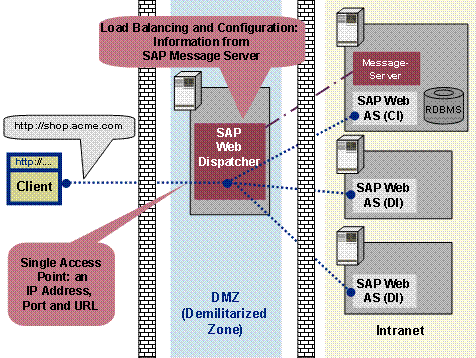
It forwards
the incoming requests (HTTP, HTTPS) in turn to the SAP Web AS of the SAP
system. The number of requests that are sent to a Web AS ABAP depends on its
capacity, which depends on the number of configured dialog work processes. The
capacity of a Web AS Java depends on the number of  Server Processes.
If the application is stateful, the SAP Web dispatcher ensures that with the
next request, the user is forwarded to the server that is processing his or
her application. To do this, it uses the session cookie with HTTP connections,
and the client IP address with end-to-end SSL (see also SAP Web Dispatcher and
SSL).
Server Processes.
If the application is stateful, the SAP Web dispatcher ensures that with the
next request, the user is forwarded to the server that is processing his or
her application. To do this, it uses the session cookie with HTTP connections,
and the client IP address with end-to-end SSL (see also SAP Web Dispatcher and
SSL).
The procedure for this is described in detail in Server Selection and Load Balancing Using the SAP Web Dispatcher.
Furthermore,
the SAP Web dispatcher decides whether the incoming request should be
forwarded to an ABAP or Java server. See also SAP Web Application
Server with ABAP and Java.

Unlike HTTP Load Balancing Using the SAP Message Server, redirects are not executed when the SAP Web dispatcher is used. This avoids the associated disadvantages (several IP addresses must be known, book marking is not possible, authentication after changing the application server).
Structure of the SAP Web Dispatcher
The
architecture is the same as the Internet Communication Manager, see the Internet
Communication Manager (ICM). It uses the same HTTP framework and is
likewise structured modularly from subhandlers. But unlike the ICM, the SAP
Web Dispatcher does not directly pass incoming requests to a work process (or
to the Java
Dispatcher), – it passes them to the ICM of the application server.
The response of the application server to a request returns to the client
using the same network connection via the Web dispatcher.
If the application server acting as the client opens connections to external HTTP servers, these connections go direct to the server (or possibly via a configured proxy) and not via the Web dispatcher.
The Web dispatcher has the function of a "reverse proxy", and not that of a proxy.
Information Tables
The SAP Web dispatcher gets information about the SAP system that it needs for load distribution from the message server and application server via HTTP.
With Java-only installations of the Web AS the message server of the Central Services
supplies the information. With ABAP installations the information comes from
the message server of the Web AS ABAP. The SAP Web dispatcher knows which
message server is used from the parameters rdisp/mshost and ms/http_port.
You could also use HTTPS here (see Setting Up Metadata Exchange via SSL). The Web dispatcher keeps the information in the following tables:
Table |
Information |
Source of Information |
|
Server table |
All SAP Web Application Servers that process the HTTP(S) requests. |
Message server of the SAP system with the server list. |
|
Group table |
Groups of HTTPS-enabled ABAP servers. Here there are known logon groups that are maintained in the system, as well as the following internal groups: |
You maintain logon groups in transaction SMLG in the system. The SAP Web dispatcher can get the information from any SAP Web AS. Each
application server belongs to at least two of the internal groups. Each server
can also offer ABAP and Java and hence belong to all groups (compare |
|
!ALL |
Group of all connected application servers. |
||
!J2EE |
Group of those application servers that contain the J2EE engine. |
||
!DIAG |
Group of ABAP servers that provide the dialog work processes. |
||
!J2EES |
Group of HTTPS-enabled application servers that contain the J2EE engine. |
||
!DIAGS |
Group of HTTP-enabled servers that provide the dialog work processes. |
||
URL mapping table |
Mapping of the path part that is specified in the browser to the information about the server (groups).
You can determine, for example, that all requests that contain the path prefix /sap/bc are only processed by the servers that process logon group GROUP_1. |
You maintain the URL path in transaction SICF as a service in the HTTP service tree. The SAP Web dispatcher can get the information from any SAP Web AS.
|
|

Additional Information
For more information on architecture and operation of the SAP Web dispatcher see:
Server Selection and Load Balancing Using the SAP Web Dispatcher
High Availability of the SAP Web Dispatcher
Processing Administration Requests
Memory Requirement of the SAP Web Dispatcher