
 Processing Administration Requests
The graphic below shows the steps involved in processing a request in the SAP Web dispatcher.
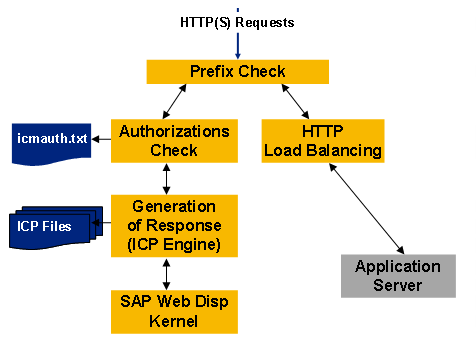
1. The SAP Web dispatcher checks whether the URL prefix of the administration prefix is (for example, /sap/wdisp/admin/). If the URL of the request does not match this prefix, the SAP Web dispatcher performs "normal" HTTP load balancing (see Server Selection and Load Balancing Using the SAP Web Dispatcher).
2. For each Web admin request the SAP Web dispatcher checks whether the user has administration authorization. The authorizations are stored in a file (usually icmauth.txt) (as hash values), which is located in the work directory (like the executables). This file nevertheless should only be readable for the user under which the Web dispatcher is running. The file contains in one line the name of the user and the hash value of the password.

# Authentication file for ICM and SAP Web Dispatcher
icmadm:$apr1$/iTOQ...$hfdJOjudsfZn7KAq5aHhCjHJu/
binadm:$apr1$/iTOQ...$s9FZ5iYn7KplKuz78jZ6fs
saphttp:$apr1$/iTOQ...$jphg67gjoWFGfd3zDSDUGn0

There is no difference in the monitoring and the administration user. A user has either no rights or all the rights to execute the Web administration interface.
You can create and maintain the authorization file with the program icmon or with the Web administration interface (see Installation and Configuration of the Web Administration Interface).
3. If the user has administration authorization, the request is passed to the Internet Communication Pages (ICP) Engine for generating a response. Either the request links to a static object (image, CSS) in the file system or to an ICP control file in the file system for dynamic contents (with the file suffix “icp“). To generate dynamic page contents the ICP engine can access the kernel of the Web dispatcher to retrieve or change information.