
 Developing Java Applications Using Web
Dynpro
Developing Java Applications Using Web
Dynpro

With this IT scenario variant companies can design and develop user interfaces for business applications, from the modeling of the entire application to the upgrade procedure. Web Dynpro for Java provides developers with a runtime as an integral part of the SAP Web Application Server and design time tools in the Developer Studio. Declarative programming and a high degree of reusability are central features of Web Dynpro technology: The separation of interface and business logic enables the creation of a flexible and versatile set of business applications.
Web Dynpro applications can be developed locally or integrated in the software lifecycle and distribution infrastructure, that is the SAP NetWeaver Java Development Infrastructure (NWDI). There is a direct connection to the NWDI from the SAP NetWeaver Developer Studio.
Web Dynpro applications are forward-looking technologies consistent with SAP’s Enterprise Service Architecture (ESA). For end users, working with easy-to-learn applications that have a Web Dynpro interface means can expect increased productivity as a result of the consistent and user-friendly front end.
The IT scenario variant Developing Java Applications Using Web Dynpro describes the procedures for developing a user-friendly user interface for back-end functionality using the development environment, the Developer Studio, the Java Engine of the SAP Web Application Server, and the NWDI.
The following figure illustrates the technical possibilities of a Java Web Dynpro application, including application integration in the SAP Enterprise Portal:
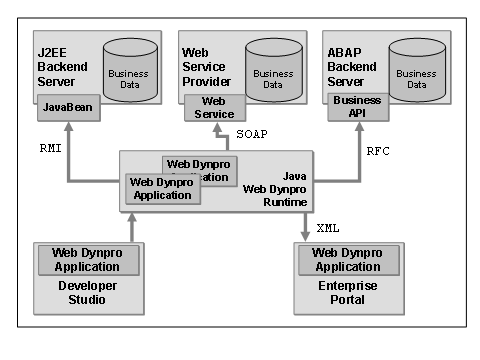
Processes of the IT Scenario Variant
The following processes are an elementary component when you program Web Dynpro applications and can be used for application planning and implementation.
IT Process |
Process Description |
Structure the Web Dynpro project and arrange it into components. |
|
|
Create reusable Web Dynpro components. |
|
Model end user navigation. |
|
Model Portal navigation. |
Implement model access. |
|
|
Define data flow: Implement data binding (data flow between the view and controller), mapping (data flow between controllers) and model binding (data flow between model and controller). |
|
Create view: Design Web Dynpro user interfaces (preferably reusable) with the aid of graphical tools (for desktop PCs as well as mobile devices). |
|
Deploy application. |
|
Test and debug application. |
|
Integrate application in SAP Enterprise Portal: Use central portal functions such as object-based navigation or WorkProtect mode. |
|
Manage application life cycle: The SAP NW Java Development Infrastructure is used to manage and version Web Dynpro applications. |
Configure application entity application: Authentication, LogoffURL, ExpirationTime, and DefaultLocale are predefined configuration parameters for the application. |
|
|
Use configuration service: Access the configuration data (name/value pairs) in the deployed properties files. |
|
Map logical systems: Set the configuration parameters for the back end access. |
Internationalize the Web Dynpro interfaces. |
|
|
Explicit personalization of the Web Dynpro application in the SAP Enterprise Portal. |
|
Other personalization options of the application without modification. |
Combine new developments with production applications. |
Required Usage Types of SAP NetWeaver
To be able to use the IT scenario variant Developing Java Applications Using Web Dynpro, you make use of the following usage types:
· Application Server Java (AS Java)
· Development Infrastructure (DI)
· Enterprise Portal (EP)
The usage types support you in planning the system landscape, the system installation and the configuration. One or more usage types are assigned to each IT scenario.

Information about the usage types is available in the Technical Operations Manual (TOM).