9.2.4 Allow the User Group to Access the Portal Page and the Portlet 
Log in to the IBM WebSphere Portal as administrator and choose Administration.
Select Manage Pages from the navigation bar on the left-hand side (section Portal User Interface) and search for the label you created in the previous chapter. Choose Set Page Permission for the corresponding entry.
 (Set Page Permission)
Choose Edit Role of the User role.
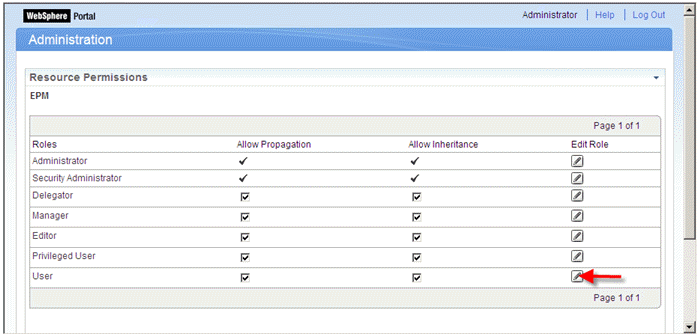 (Edit Role)
Choose Add.
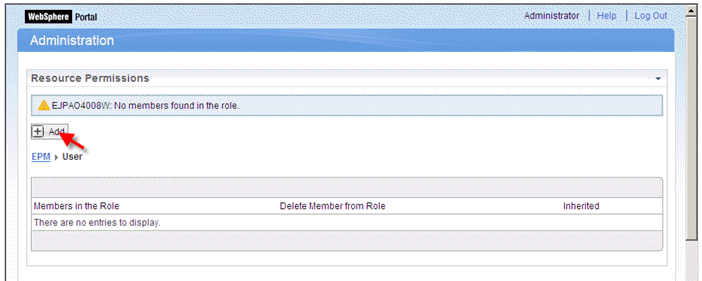 (Add)
(Add)Search for all User Groups, select the EPM user group and confirm your entries with OK.
 (EPM Users)
Select the label’s title link (EPM) and choose Done.
Select Portlets from the navigation bar on the left-hand side (section Portlet Management) and search for the portlet you created in chapter 9.2.2 Create a Portlet Pointing to a WDA Application Via NWBC. Choose Assign access to Portlet for the corresponding entry.
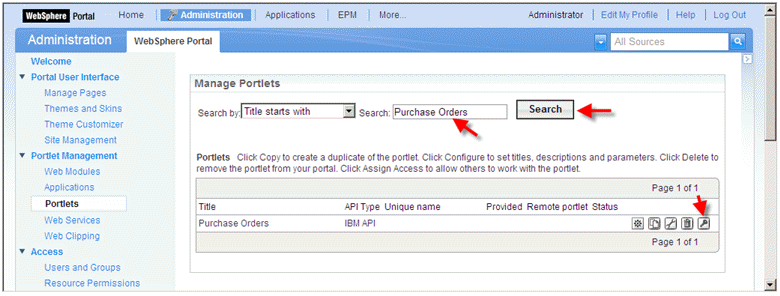 (Assign access to Portlet)
Repeat steps 3 to 5 for the currently selected page.
Click on the portlet’s title link (Purchase Orders) and choose Done.